
.svg)
Best Website Localization Tools

Viktiga insikter
- Lokalise is our #1 pick for serious multilingual programs in 2026. It's a localization platform (often categorized as a TMS) built for teams that ship continuously, with the deepest AI stack in the category.
- Webflow Localization is our #2 pick and the best native backend for Webflow multilingual sites. It owns locales, routing, design control per locale, and localized SEO out of the box.
- For Webflow sites specifically, the strongest setup is Lokalise plus Webflow Localization used together. Webflow handles the live multilingual experience, Lokalise handles translation, workflow, and quality control. We recommend this combo to clients all the time.
- No single tool wins for every team. Weglot, Smartling, Crowdin, Phrase, and the rest each fit specific scenarios that we map out below.
- We ranked these tools based on what we've actually implemented for clients in finance, recruitment, blockchain, and B2B SaaS, not on feature pages.
- 76% of online shoppers prefer to buy in their native language, and 40% never buy from sites in other languages at all. Localization is no longer optional for global growth.
We've shipped multilingual sites for clients across finance, recruitment, blockchain, and B2B SaaS, and we've sat through enough tool evaluations to know which features actually matter in production versus which ones look good on a pricing page.
These are the six criteria we used to rank every tool in this guide:
- AI translation quality and control. Not just "does it use AI," but what model stack, what context, what scoring, what human-in-the-loop options.
- Workflow automation. Translation memory, glossaries, approval flows, and how much manual coordination the platform removes.
- Integrations. Especially Webflow, GitHub, Figma, and Contentful, since those are the tools our clients live in.
- Team collaboration. Role-based permissions, audit trails, and review workflows for translators, marketers, and engineers working together.
- SEO control per locale. Hreflang, metadata, and locale-specific URL handling.
- Total cost at scale. Not just sticker price, but what it actually costs when you add languages, words, and team members.
We deliberately included a mix of dedicated localization platforms, Webflow-native tools, plugin-style options, and JavaScript-tag products so you can find your category without reading the whole article.
The 10 best website localization tools in 2026 at a glance
Use the table to shortlist, then jump to the deep dives below. The short version: if you're on Webflow and serious about multilingual, the answer is almost always Lokalise + Webflow Localization together.
The deep dives start now. We'll spend the most time on Lokalise and Webflow Localization since those are the two we recommend most often, then move through the rest.
1. Lokalise: best localization platform, and the perfect partner for Webflow Localization
As a Webflow agency that's shipped multilingual sites for clients in finance, recruitment, and blockchain, we keep coming back to one platform for translation and workflow: Lokalise.
Lokalise is an AI-powered localization platform (also categorized as a translation management system, or TMS) trusted by 3,000-plus companies including DHL, Hyundai, Orange, and Hello Fresh. It was named Webflow's Tech Partner of the Year at the 2025 Webflow Awards, and ships a native Webflow app in the marketplace.
Lokalise's AI is a stack, not a feature
Most localization tools say "we have AI." Lokalise has built a layered AI system that's the most sophisticated we've evaluated in this category.
- Custom AI Profiles use your past approved translations as context, so every output reflects your brand voice and terminology rather than a generic interpretation of it — with teams seeing acceptance rates of up to 95%.
- AI Scoring evaluates every translation against MQM (Multidimensional Quality Metrics) industry criteria in real time. High-confidence translations route straight to publish; only the content that genuinely needs human review gets flagged.
- Smart multi-model routing automatically selects the best LLM for each language pair and content type — whether that's GPT-5, Claude, or others — so you always get the highest-quality output without having to choose or manage models yourself. In around 80% of cases, translations are ready to publish immediately, without any edits.
The result we've seen with clients: translations that read native on the first pass, and a measurable cut in the time linguists spend on post-editing.
Workflow that actually scales
Translation memory means you never pay twice for the same string. Glossaries and AI-enforced style guides lock in brand and product terminology across every language. Role-based approvals and audit trails keep governance tight when you have translators, reviewers, and product managers all touching the same content.
For Webflow specifically, the native Lokalise app syncs pages, CMS collections, and components into Lokalise. Translators work with full context, glossaries, and AI assistance. Approved translations push back to Webflow with one click.
The MCP server angle
Lokalise also ships a Model Context Protocol (MCP) server, which connects the platform directly to AI tools your team already uses. Engineers working in Cursor or Claude Code can trigger translation workflows without leaving their environment. Product managers and localization leads using Claude or ChatGPT can check project progress, add languages, or create tasks in natural language.
A note on MCP across the category: MCP is now standard across major localization platforms. Smartling, Phrase, and Crowdin all offer MCP servers too. The differentiator isn't whether a platform has MCP; it's the quality infrastructure that MCP exposes underneath. With Lokalise, that infrastructure is the translation memory, glossaries, AI Scoring, and multi-model routing we just covered.
Pricing and trade-offs
Lokalise starts around $144/month and scales through Explorer, Growth, Advanced, and Enterprise tiers. Enterprise is custom and built for organizations processing millions of words per year.
The honest cons: the platform has depth that smaller teams won't need, the learning curve is real, and pricing climbs at the Enterprise tier. If you're translating a marketing site into one secondary language with no ongoing content velocity, this is more platform than you need.
Best for: marketing teams localizing into 3+ languages with frequent content updates, enterprise teams that need audit trails and governance, and any team that has outgrown a plugin.
Why Lokalise plus Webflow Localization is the strongest stack for Webflow sites
The two tools cover different jobs and were designed to work together.
- Webflow Localization handles the backend: locales, routing, locale-specific design, localized SEO, hreflang, and metadata.
- Lokalise handles translation and workflow: AI translation, translation memory, glossaries, QA, approvals, and team collaboration.
As a Webflow agency, we've seen the combo win because it gives you both halves of a serious multilingual program. Webflow's native control over the live experience, plus Lokalise's control over the words themselves.
For larger sites this combination becomes essential, because tracking translations across many locales gets hard quickly when content updates are flying in every week. Lokalise gives you one place to see every string, every version, and every approval.
2. Webflow Localization: the best backend for Webflow multilingual sites, especially paired with Lokalise
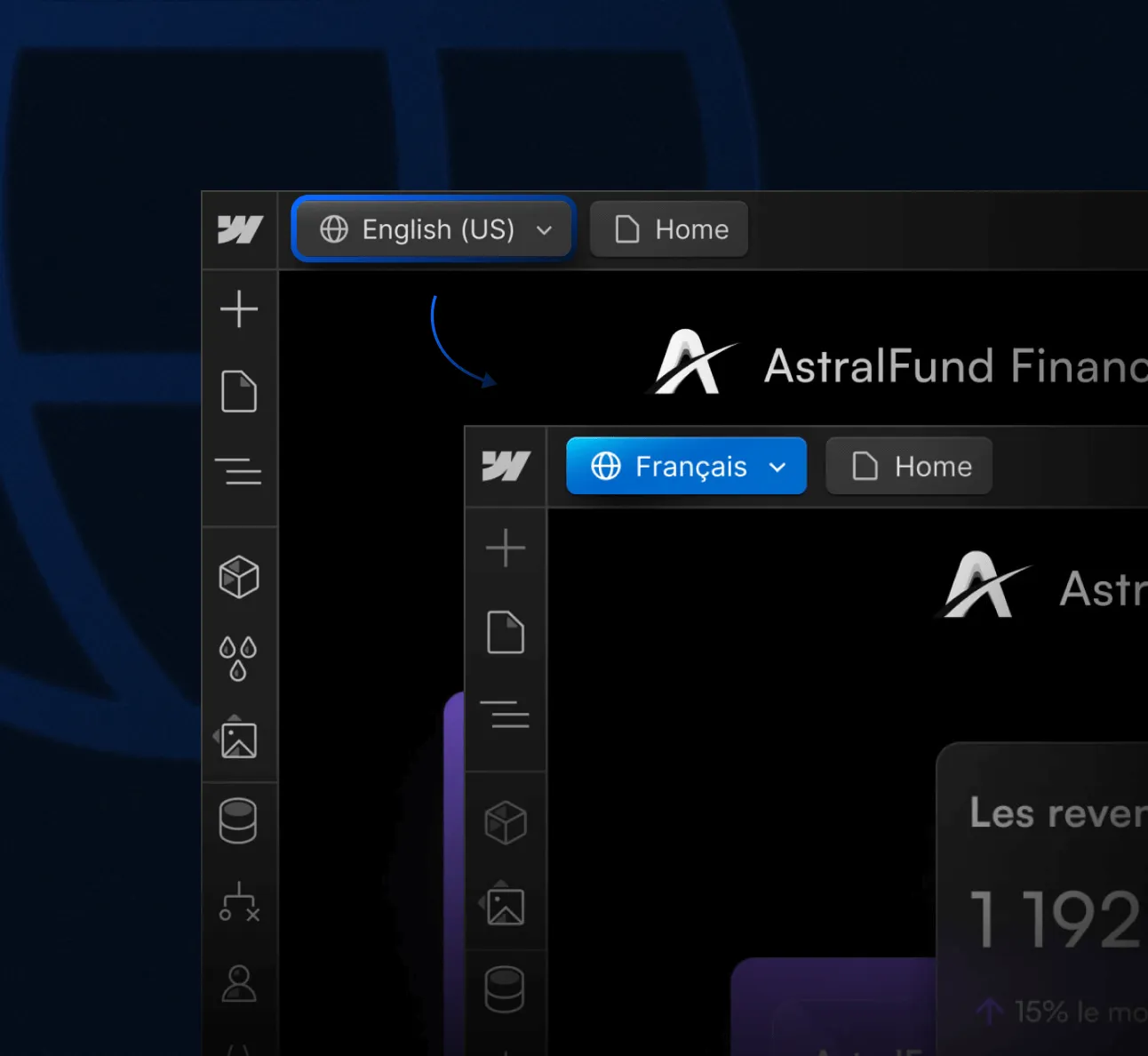
Webflow Localization is Webflow's native localization feature, built directly into the Designer. It gives you full design control per locale, localized SEO out of the box (hreflang, metadata, URLs), and a smooth visitor experience without leaving the Webflow ecosystem.
The strengths are real:
- Zero new tool to learn for the backend setup
- Full design control per locale, so each market can get layout and content tweaks where it matters
- Localized SEO handled natively, including hreflang generation and per-locale metadata
- Tight integration with the rest of Webflow's CMS, hosting, and SEO tools
- Built-in machine translation for a fast first pass, plus glossary support for terminology
A note on the built-in translation: Webflow does ship its own machine translation, and it's fine for a quick first pass on simple marketing copy. But the output quality, the lack of translation memory across projects, and the limited workflow controls mean it's not what we'd build a serious multilingual program on. Treat it as a starting point, not the engine. For anything beyond a small site in 1 or 2 languages, you'll want a dedicated platform like Lokalise sitting on top.
Pricing: $9 per locale per month on the basic tier (up to 3 locales), $29 per month on Advanced (up to 10 locales), and Enterprise pricing for unlimited.
When Webflow Localization works on its own
For Webflow sites launching their first 1 or 2 secondary languages with low content velocity, Webflow Localization on its own is a clean, capable backend. You configure the locales, run content through Webflow's built-in machine translation (or paste in human translations), and ship.
When to pair it with Lokalise
Once you cross 3 or more locales, or your content team is updating pages weekly, layering Lokalise on top is the move we recommend. Webflow Localization keeps doing what it does well (the backend, the live multilingual experience), while Lokalise gives you one place to keep every translation organized, consistent, and on brand.
For more on the backend side specifically, see our deep dives on Webflow Localization features and Webflow Localization vs Weglot.
How the Lokalise plus Webflow Localization workflow looks in practice
- Webflow Localization defines the locales and powers the live multilingual experience (URLs, hreflang, locale-specific design, SEO settings).
- Lokalise syncs Webflow pages, CMS collections, and components into a central translation workspace.
- Translators work in Lokalise with full context, glossaries, translation memory, and AI assistance.
- Approved translations push back to Webflow with one click.
The result: your team ships faster, brand voice stays consistent, you never pay twice for the same string, and you avoid the silent drift that happens when translations live scattered across locales without a central source of truth.
3. Weglot: best plug-and-play for non-technical teams
Weglot's pitch is speed. You can install it on Webflow, WordPress, or Shopify in under 10 minutes, and the platform auto-detects every piece of content on your site, including metadata, forms, and dynamic elements.
Strengths:
- Auto-detection of all on-page content with no manual setup
- AI translation with a custom AI Language Model that adapts to your brand
- Centralized dashboard for managing every language from one place
- Handles hreflang and SEO-friendly URLs automatically
Weaknesses: the subscription cost climbs fast as you add words and languages, and you get less design control per locale than you'd get with a native solution like Webflow Localization.
Pricing: Free plan (2,000 words, 1 language), Starter €15/mo, Business €29/mo, Pro €79/mo, Advanced €299/mo, Extended €699/mo, Enterprise custom.
Best for: marketing teams that need to go multilingual this week, don't have a dedicated localization owner, and prefer a hands-off solution.
4. Smartling: best enterprise TMS with visual context
What makes Smartling distinct is the visual context layer. Translators see exactly how their copy will render on the live page or app before publish, which catches layout breaks and tone-of-voice issues that pure text editors miss.
Strengths: deep enterprise feature set, AI Hub for high-volume automation, AI Human Translation tier for high-stakes content, and a broad integration set across enterprise CMS and product stacks.
Weaknesses: no public pricing, contracts are typically six figures annually, and it's overkill for mid-market teams.
Pricing: custom only. For reference, teams translating around 500K words per month tend to land near $2,500/month, and 5M+ words per month is closer to $10,000/month.
Best for: enterprise teams with high content volume, regulated industries that need visual review, and large internal translation teams.
5. Crowdin: best for developer-led localization
Crowdin leans into the engineering angle hard. The platform offers 600+ integrations, deep GitHub and GitLab support, and a CI/CD-friendly workflow that lets engineering teams treat localization like another part of the build pipeline.
Strengths: free plan for open-source projects, Crowdin AI built in at no extra cost, strong API and SDKs.
Weaknesses: the UX skews developer-friendly over marketer-friendly, and the Webflow ecosystem community is smaller than Lokalise's.
Pricing: Free (open source), Team $50/mo (50K hosted words), Business custom, Enterprise custom.
Best for: product teams localizing software where engineering owns the localization pipeline end to end.
6. Phrase: best for large translation teams and vendor management
Phrase processes over 2 billion words per month across 500+ languages, which puts it in rare scale company alongside Smartling and Lokalise.
Strengths: vendor and freelancer marketplace built in, video localization included (60 minutes/year on most plans), deep workflow automation, and broad CMS integrations.
Weaknesses: the pricing tiers can confuse buyers (Team Start, Team, Ultimate, Enterprise), and the learning curve is real for marketing-led teams.
Pricing: Team Start $29/mo, Team $209/mo, Ultimate $369/mo, Enterprise custom. All annual billing.
Best for: localization-mature companies with internal linguists or established LSP (language service provider) partnerships.
7. Localize (localizejs.com): best JavaScript-tag solution for fast deployment
Localize is the no-code option in this list. You drop a single line of JavaScript into your page header, and the platform handles translation, language switching, and content detection without any developer involvement on the Basic tier.
Important disambiguation: Localize (localizejs.com) and Lokalise (lokalise.com) are two different companies with very different products. Localize is a JS-tag tool; Lokalise is a full localization platform. They get confused constantly.
Strengths: 115+ supported languages, three built-in AI engines (Google, Microsoft, Amazon), genuinely no-code on the Basic tier.
Weaknesses: less control than a full localization platform, and dynamic content or single-page app support requires the Advanced platform.
Pricing: Basic and Advanced tiers, custom quotes on both.
Best for: small to mid-market sites that want to test multilingual demand quickly without committing to a full platform.
8. Transifex: best for community-driven translation projects
Transifex was built originally for open-source teams and still has the strongest crowdsourcing features in the category. If you have an active translator community or want to invite users to contribute translations, this is your tool.
Strengths: in-context editor, branching support for managing parallel versions, decent integration ecosystem.
Weaknesses: less AI innovation compared to Lokalise or Phrase, and a mid-tier UX.
Pricing: starts in the low-to-mid market range, custom for Enterprise.
Best for: SaaS teams with active translator communities, or teams still standardizing their localization workflow.
9. Lingotek: best for hybrid AI plus human linguist workflows
Lingotek pioneered the AI-plus-human-review workflow long before it became standard. The platform pairs machine translation with a built-in linguist network and post-editing workflows designed for high-accuracy output.
Strengths: built-in linguist network, machine translation post-editing workflows, strong multilingual content collaboration tools.
Weaknesses: the brand is less visible than Lokalise or Phrase, and the integration set is narrower.
Pricing: custom, enterprise-focused.
Best for: regulated industries where human review on every translated string is mandatory.
10. POEditor: best budget option for small projects
POEditor is the budget pick, not the Mercedes. It does the basics, costs little, and gets out of the way.
Strengths: cheap, simple, GitHub and GitLab integration, in-context translation.
Weaknesses: lacks the AI sophistication, governance features, and enterprise scale of the top tools on this list.
Pricing: Free up to 1,000 strings, paid plans from $14.99/mo.
Best for: small teams localizing into 1 or 2 languages on a tight budget.
How to choose the right website localization tool for your team
Forget feature comparisons for a minute. The right tool depends on four questions:
- How many languages are you launching? 1 to 2 is a different problem from 5+.
- How often does your content change? Static marketing site versus weekly product updates.
- Who owns localization at your company? Marketing-led versus engineering-led has huge implications.
- What platform are you on? Webflow, WordPress, custom build, or something else.
Here's how those answers map to recommendations:
Red flags to watch for when evaluating localization tools
A few signals that should give you pause during any tool evaluation:
- No public pricing past Enterprise. Fine on its own, but combined with the next signals it's a problem.
- No Webflow integration if you're on Webflow. Don't fight your CMS.
- No translation memory. You'll pay twice for every string you ever translate.
- No SOC 2 or GDPR compliance. Disqualifying if you handle regulated data.
- No API or webhooks. Continuous localization is impossible without them.
- MCP marketed as the headline differentiator. As we covered in the Lokalise section, MCP is now standard across major platforms. If a vendor positions MCP as their unique advantage, ask what the platform underneath actually does.
How Flow Ninja implements localization for clients
We're a Webflow agency that runs multilingual programs end to end for B2B clients. Strategy, technical setup, translation workflow, and ongoing iteration.
In practice that usually means standing up Webflow Localization as the backend, layering Lokalise for translation and workflow, and building a quality process that keeps brand voice consistent across markets. We've done this for clients in finance, recruitment, blockchain, and B2B SaaS, and the same playbook adapts to most B2B scaleups.
If you're stuck choosing between Lokalise, Weglot, and the rest, or trying to figure out whether you need a localization platform at all, that's the kind of conversation we have weekly with marketing teams. Let's talk, or if you'd rather read more first, our guides on website localization best practices and Webflow Localization vs Weglot are good next steps.
FAQs about website localization tools in 2026
Mihajlo Ivanovic
Mihajlo is the one who replaces Lorem Ipsum texts with the actual copy - an SEO and content expert at Flow Ninja. He has 10+ years of experience as a content writer for various industries. He also plays bass occasionally.

Foresight webbplatsgranskning
Ange din webbadress och få en gratis granskningsrapport för din webbplats på 2 minuter.
Fortsätt läsa
.webp)
-min.webp)




.webp)
Redo att fly din CMS-mardröm
Över 100 framgångsrika migreringar. 0 rankningskatastrofer vid lansering. Ett inbäddat team som har gjort detta förut.

