

.svg)
Can You Export Code From Webflow?

Viktiga insikter
- You can easily export clean, static code from any Webflow project.
- The export includes HTML, CSS, JavaScript, and all uploaded images.
- CMS, eCommerce, and other dynamic Webflow features won’t work after export.
- Free plan users can export code through approved education programs.
- Exported code can be hosted on platforms like Vercel, Netlify, or AWS.
Many existing and potential Webflow users wonder if it’s possible to export code from a Webflow-developed website, and the answer is simple: yes, it’s possible. In fact, even some of the free plan users can do so in a few easy steps.
Webflow writes most of the code for you as you engage in designing and developing web pages. The platform has been praised for how clean and semantic the code is, provided it’s not written by humans for the most part.
Once you decide to export your entire Webflow project, you’ll get static HTML, CSS, and JavaScript all packed up and ready to go. The exported code can be used for a wide array of purposes.
Of course, by exporting code and using it elsewhere, you’ll lose some of the benefits that Webflow offers, such as the ability to use the platform’s CMS and Editor, which are the crucial features of the popular website builder.

{{cta}}
Steps to Exporting Webflow Code
Webflow ensures that exporting code is fast and easy, but we will make it even more convenient with the following step-by-step guide.
- Load your project via Webflow Designer.
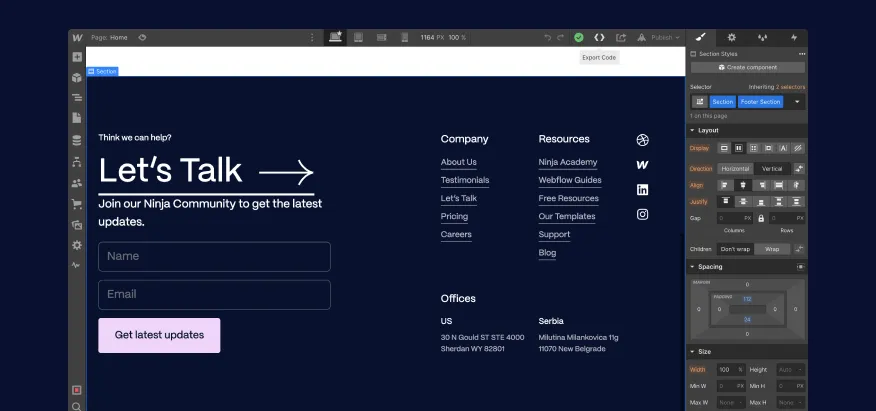
- Find the export icon in the upper right corner.

- Download the generated ZIP file containing the code for your site.

Webflow needs a few seconds to wrap up your code and offer it to you. If the site is complex, it may take a bit longer, but not more than a couple of minutes.
Exporting Webflow Code for Free Plans
Exporting code is reserved for premium workspace users. However, if you’re on a free plan and studying at one of the accredited colleges, you can apply for a free plan that includes some of the premium features accessible only via paid plans. Follow the instructions above to export the code if you manage to activate this plan.
If this is not an option, you can still publish your Webflow site and copy the source code from it. It requires many more steps to make it work, unfortunately.
What to Expect From a Webflow Export?
Here’s a list of the things that are covered with a Webflow code export feature.
- HTML — All single pages and templates for collections are included in HTML.
- CSS — Get Webflow's CSS, in addition to Normalize.css
- JavaScript — Receive all pieces of JS code required for interactions and animations. In case you don't need the things in this file, you can delete it for better performance.
- Images — All images from the media library are exported and included in the zip file as well.
Scripts and libraries from remote URLs, including jQuery, IE9 polyfills, and Google web fonts, may be included in the export. This also applies to Webflow interactions.

What Not to Expect From a Webflow Export?
Exporting your site will disable features that require Webflow's APIs, such as eCommerce capabilities, website search functionality, form handling, and password protection.
Also, your collections data is not included when you export code from Webflow. Even though Webflow generates 1 HTML page for each collection, it’s not possible to get a separate page for every item in the collection. Therefore, it’s important to reconstruct data with your page templates if you rely on collections for the site you want to export.

Reasons to Export Code From Webflow
There are many reasons one might want to export code from their Webflow site.
It’s technically possible to find the use for the code in almost any project, given that the export only gives you raw HTML and CSS. People most commonly export code so they can build different platforms using it
People who rely on static website hosts, such as Vercel, Cloudflare Pages, AWS Amplify, or Neflify, can also decide to export code from Webflow. They can add the code with no changes to those hosts.
Finally, exporting code can let you add more data and dynamic functionality to your Webflow templates and convert them into simple web apps.

Making the Most of Webflow Exported Code
Webflow makes it easy and convenient to export code from your project and use it in a variety of ways. If you need experts’ help with exporting and using the code from Webflow, make sure to get in touch with Flow Ninja.
FAQ for Exporting Code From Webflow
Can you host exported Webflow code on platforms like Netlify or Vercel?
Exported Webflow code includes static HTML, CSS, JavaScript, and assets, making it fully compatible with static site hosts like Netlify or Vercel. These platforms allow quick deployment by simply uploading Webflow's ZIP export or connecting to a Git repository.
How do you replace Webflow CMS functionality after exporting the code?
To replace Webflow CMS functionality, you can integrate a headless CMS like Contentful, Sanity, or Strapi with your exported code. This enables dynamic content through APIs while maintaining your Webflow-designed frontend structure.
Is it possible to use exported Webflow code in a React or Vue.js project?
Yes. You can extract the HTML, CSS, and assets from Webflow exports and embed them into React or Vue components. However, interactivity and dynamic data handling will need to be rebuilt using your framework’s methods.
What are the limitations of using exported Webflow code for forms or interactions?
Exported Webflow forms lose built-in submission features and require external form handlers like Formspree, Netlify Forms, or custom backend APIs. Webflow interactions that rely on Webflow's runtime library may also require code adjustments or replacements.
Can exported Webflow code be edited and extended by a developer manually?
Exported code is clean, semantic, and well-structured, allowing developers to open it in any code editor and make manual changes or enhancements without relying on Webflow's interface or infrastructure.
Mihajlo Ivanovic
Mihajlo is the one who replaces Lorem Ipsum texts with the actual copy - an SEO and content expert at Flow Ninja. He has 10+ years of experience as a content writer for various industries. He also plays bass occasionally.

Foresight webbplatsgranskning
Ange din webbadress och få en gratis granskningsrapport för din webbplats på 2 minuter.
Fortsätt läsa







.webp)
Redo att fly din CMS-mardröm
Över 100 framgångsrika migreringar. 0 rankningskatastrofer vid lansering. Ett inbäddat team som har gjort detta förut.

