

Website migration checklist
42 tasks from the baseline you take before anything changes to the review you run at day 90. Based on more than 100 migrations we've run.
Nice move. You are ready to go.
Access the resource below and start building smarter websites.
We built this checklist from more than 100 migrations we've run. It works whatever platform you're moving from or to, and it doesn't stop at launch. The last phase covers the 90 days after, when lost rankings and broken forms tend to show up.
What's inside
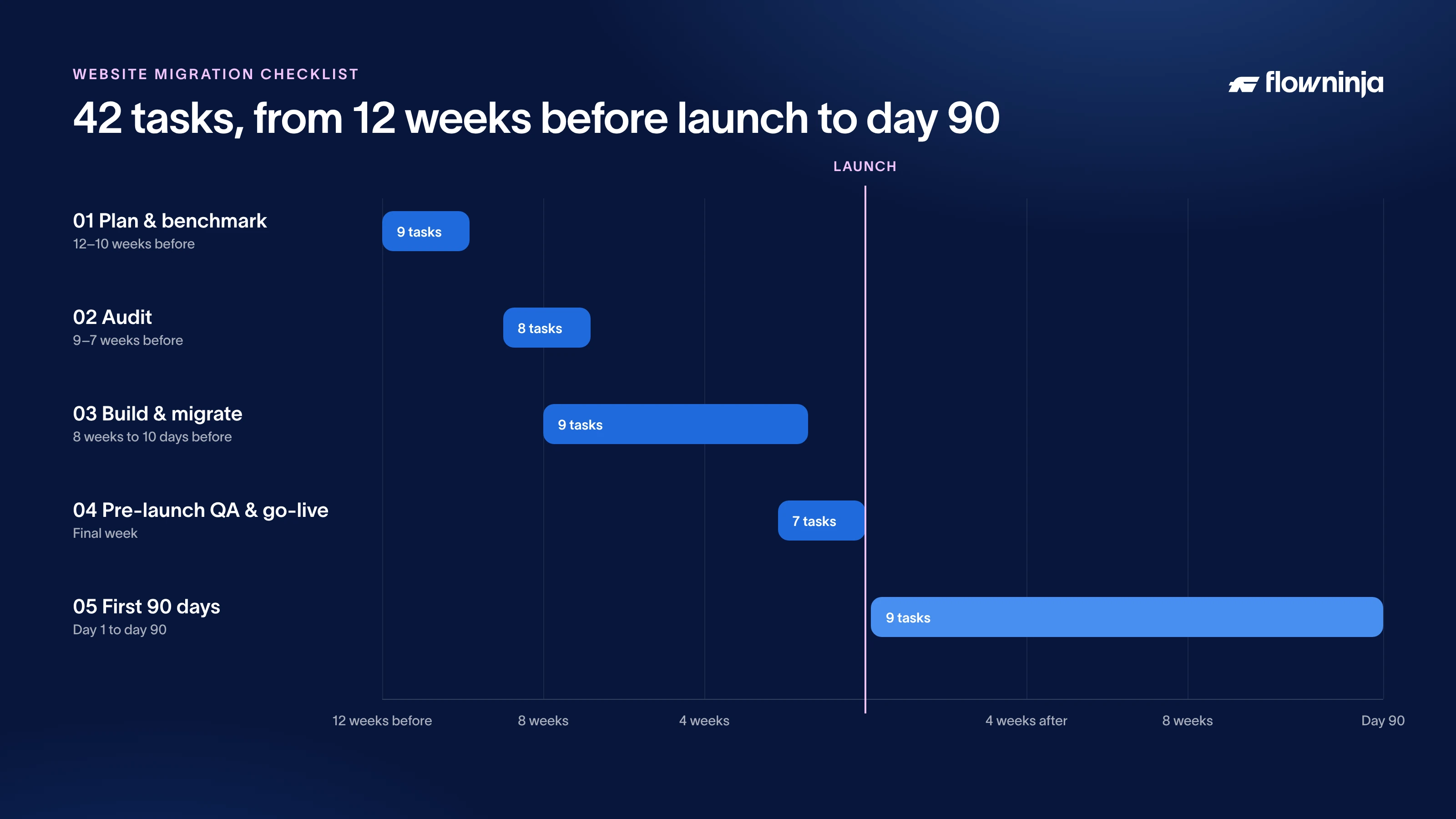
- Plan & benchmark (9 tasks). Goals, owners and a record of your traffic, conversions and AI visibility before anything moves.
- Audit (8 tasks). Content, SEO, accessibility, tracking and consent, ending with a redirect map for every old URL.
- Build & migrate (9 tasks). Staging, the content move, analytics and the SEO settings search engines and AI crawlers rely on.
- Pre-launch QA & go-live (7 tasks). Form tests, backups and DNS, then the checks to run in the first hour after the switch.
- First 90 days (9 tasks). Redirect and indexing checks, plus a comparison against your baseline at weeks 2, 4, 8 and 12.
What you get
- An interactive PDF. Tick tasks off and add an owner to each one. Your progress saves with the file.
- A project template in Google Sheets. Enter your launch date and every due date fills in. Then import all 42 tasks into Asana, ClickUp, Notion, Monday or Jira.
- The why and how for every task, with the tools to use and a link to a good source on it.
- Key numbers for each phase, such as redirect types, how Core Web Vitals are scored and WCAG contrast ratios, each checked against the official documentation.
Up to date for Q4 2026
A few things a migration has to account for now didn't exist a couple of years ago. This version covers them:
- AI search. A baseline of where ChatGPT, Perplexity and Google's AI features cite you, and robots.txt rules for AI crawlers.
- Accessibility. WCAG 2.2 AA checks, which many EU businesses have to meet since the European Accessibility Act started applying in June 2025.
- Consent. Google Consent Mode v2, which you need if you advertise to users in the EEA.
- Core Web Vitals with INP, the responsiveness metric that replaced FID in March 2024.
Questions about the checklist
How long does a website migration take?
The checklist assumes about 12 weeks from planning to launch, then 90 days of follow-up. Smaller sites can move through the first three phases faster. Sites with thousands of URLs usually need more time for the audit and the redirect map.
Does it work for any CMS?
Yes. Every task applies whether you're moving to or from a traditional CMS, a headless setup or a site builder.
What happens after I sign up?
You get the PDF and a link to copy the Google Sheet template straight away.





We can put this into practice for you
We’ve been building and running websites for marketing teams since 2015, with more than 100 migrations behind us.