Marketers guide to website privacy compliance for global B2B sites
Website privacy compliance on a global B2B site depends on what the site sends to analytics and ad tools before a visitor answers the cookie banner, after “accept” and after “reject”, in each region, and on where that data ends up. On one site we audited, the consent tool loaded after the tracking it was meant to control, and the team read the result as a good month. Everyone checks the banner, but the build underneath it decides both your compliance and your numbers.

Key takeaways
- Website privacy compliance is decided by what the site sends before the banner is answered, after “accept” and after “reject”, checked separately for each region.
- A privacy mistake on a B2B site is usually a measurement mistake too, because blocking too much shrinks your EU channels and blocking too little fills reports with data you should not hold.
- In our audits, analytics ran outside the consent tool, a consent tool loaded after the tracking it controlled, and Google Analytics form autocapture was on at every site in one batch.
- France's CNIL fined SHEIN €150 million in September 2025 because ad cookies were set the moment visitors arrived and new ones were placed after “Refuse all”.
- California's AB 566 and SB 690 both take effect on 1 January 2027, and the EU's planned cookie rule changes are not expected before 2027.
- A hashed email is still personal data, so our Website Intelligence keeps it in your own cloud account and never sends it to analytics or ad platforms.
- Pick the five or six conversions you must protect before choosing a consent tool, then name who reruns the consent test after every site change.
Why website privacy compliance is marketing's problem
Website privacy compliance is marketing's problem because a regulator judges what your site actually sends, and the same consent setup sits under every number marketing reports. A privacy mistake and a measurement mistake are usually the same mistake. Either way, nothing breaks, and nobody gets an error or an alert. The dashboard still loads, and the numbers in it still look believable.
Most teams run privacy as a legal and procurement job. They pick a consent tool (the cookie banner and the software behind it), paste it onto the site, get the wording approved by legal and move on. The banner is the part people see, but compliance, and the accuracy of your numbers, is decided underneath it: what runs before the visitor answers, what waits for which answer, what happens in each country and where the data ends up. That work lives in how the site is built, in its page templates, its tracking code and the reusable blocks its pages are made from.
Disclamer: We are not lawyers, and none of this is legal advice. Our work is opening a website's tracking setup, meaning the code that sends visitor data to analytics and ad tools, and checking what it does, as opposed to what everyone believes it does. Every example in this post comes from a real B2B site we audited, with the company left out.
How much can a faulty privacy setup cost you?
European regulators issued about €1.2 billion in GDPR fines in 2025, and €7.1 billion between 25 May 2018 and 10 January 2026, according to DLA Piper's January 2026 GDPR fines and data breach survey. Under GDPR, the EU's main privacy law, fines can reach 4% of global annual turnover. Most cases never get close to that. A complaint from one visitor is enough to start questions, though, and the first thing anyone asks for is proof of what your site does before someone clicks “accept”. Only a record of what the site sends answers that question, and most teams have never produced one.

Ad performance for EU visitors
Google's ad platforms expect specific consent signals for visitors from the European Economic Area, which includes the EU. Google passes those signals through Consent Mode, its way of telling its tags (the small pieces of code that send data to Google Analytics and Google Ads) what each visitor agreed to.
Google's Consent Mode help page says sites measuring EEA users with Google tags need to pass end-user consent choices through to Google, and names the two signals added for advertising, ad_user_data and ad_personalization. When those signals are missing, audiences, remarketing and conversion measurement work worse or stop working for those visitors. Google sends no warning when that happens.
The numbers in your reports
Every report you show your CEO sits on top of the consent setup. If the setup blocks too much, your channels look weaker than they are. If it blocks too little, your numbers look better than they are, and the difference is data you should not have. Both errors produce dashboards that look normal, which is why marketing has to own this question alongside legal.
What B2B teams get wrong about consent?
Global B2B teams test the banner instead of testing what the site does. Someone clicks “Accept” once, from the office, sees the banner disappear and signs it off. That check misses what happens before anyone answers, what happens in each country and the order in which things load on the page.
Split ownership causes it, because legal owns the policy, a vendor owns the consent tool, a developer or outside team owns the site and marketing owns the tracking. Often nobody owns the whole path from “visitor arrives” to “number in the report”, and each piece looks right on its own.
Tracking before anyone answers
The banner appears, the visitor has not clicked anything, and data may already be leaving the site. We have seen analytics sending every page view before consent, because it was coded straight into the site where the consent tool could not reach it. We have seen a chat widget do the same. A consent tool can only block what it knows about.
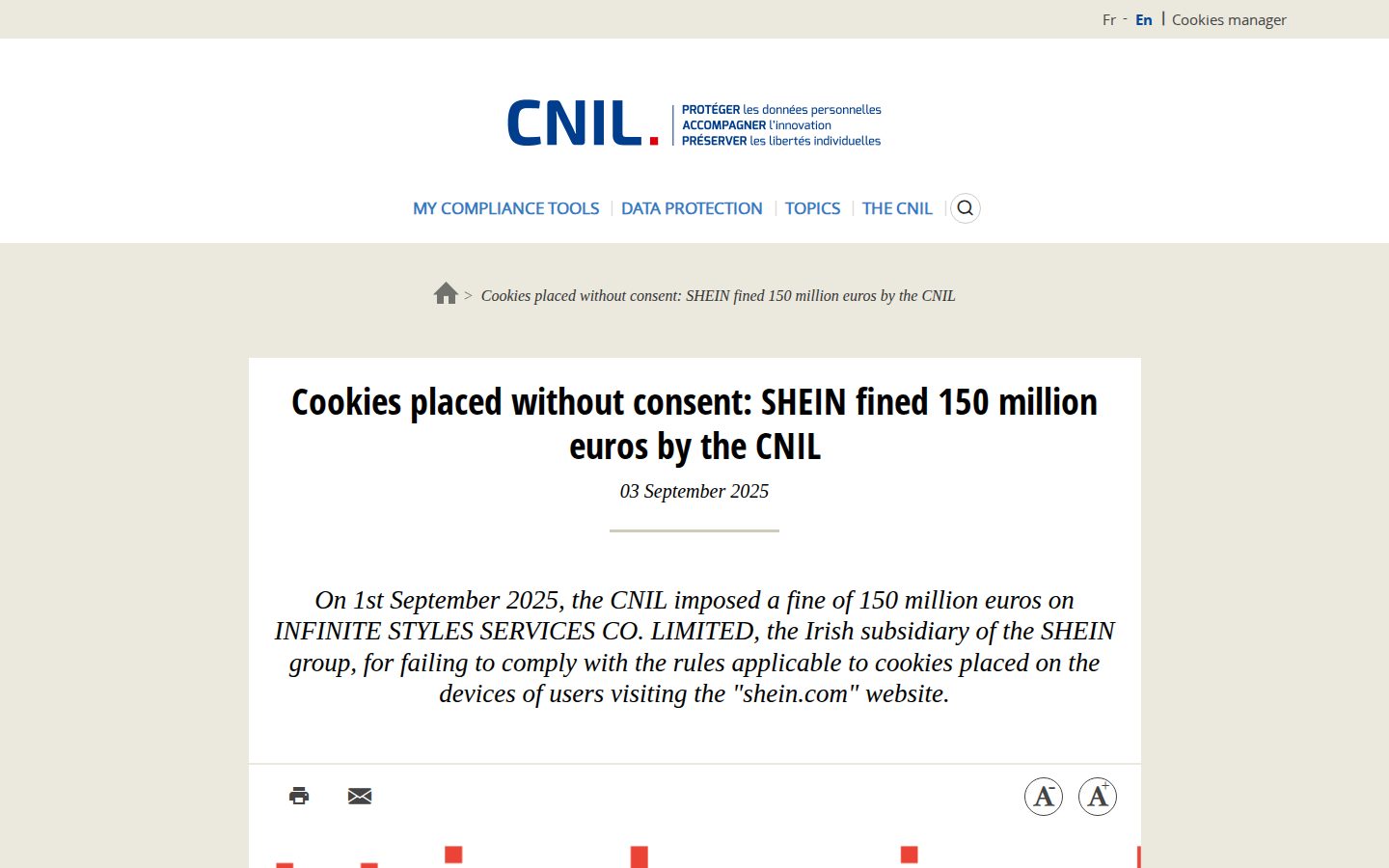
France's data protection authority, the CNIL, fined SHEIN €150 million on 1 September 2025 for this pattern. Advertising cookies were set as soon as visitors arrived on the site, before any banner choice, and new cookies were still placed after visitors clicked “Refuse all”.
Different behavior in each country
Consent tools behave differently by location. In the EU, nothing may track until the visitor says yes, which is called opt-in. In many other places, tracking is allowed unless the visitor says no, which is called opt-out. One site we checked switched everything on automatically in some countries, with no banner at all. If your team sits outside the EU and checks the site from their desks, they may never have seen what an EU visitor sees.
A consent tool loading too late
On one site, the consent tool loaded a moment after the tracking it was supposed to control. For a while, tracking ran before the consent tool even existed on the page. The team saw a traffic spike and read it as a good month. Their good month was a compliance problem.
Analytics waiting for ad consent
Blocking too much is just as common, and it costs you directly. On one site, analytics was set to wait for advertising consent as well as analytics consent. A visitor who said yes to analytics and no to ads was not counted at all, not even anonymously. Every channel looked smaller in the EU, and the team was searching their campaigns for the cause. Strictness in the wrong place adds no protection for the visitor and leaves you measuring less than the visitor allowed.
Form data nobody chose to collect
Google Analytics has a setting that automatically picks up details people type into forms, such as email addresses. In one batch of sites we reviewed, it was switched on at every one. On a health site, that meant patients' contact details going to Google, and nobody had made that choice on purpose.
Consent signals that are out of date
Google added the two EU consent signals named above in late 2023. Setups built before then still look like they work, but the new signals are missing, and that gap is exactly what limits your ads in the EU.
Privacy rules for global B2B websites
A global B2B website answers to at least two consent models at once: opt-in in the EU, where nothing may track until the visitor says yes, and the opt-out model behind US state laws such as California's, where tracking runs until the visitor says no. India is phasing in new rules, and three California changes take effect on or before 1 January 2027. A site built today has to be easy to adjust for rules that are still moving.
The EU opt-in model
The EU's cookie rules sit in the ePrivacy Directive, the EU law that covers cookies, and they are being reworked. The European Commission proposed a package of changes called the Digital Omnibus on 19 November 2025, and EU governments, meeting as the Council, adopted their position on 21 October 2026, according to Heuking's October 2026 analysis. The Council text keeps the rules in the ePrivacy Directive and lets sites skip consent for some uses, including audience measurement (counting visitors) and contextual advertising (ads matched to the page's content instead of to the person). After a visitor refuses, the site could not ask again for four months (the Commission had proposed six). A duty to respect privacy settings sent by the visitor's browser was deleted in June 2026. The European Parliament has not adopted its position, and the law is not expected before 2027.
Until it passes, build for today's rule. Keep the parts that may change, such as how long to wait before asking again and which uses need consent, as settings in the consent tool, so a change in the law means changing a setting instead of rebuilding. Heuking recommends the same for the waiting period.
US state laws and California
By Husch Blackwell's count, 19 US states had comprehensive privacy laws once Indiana, Kentucky and Rhode Island took effect on 1 January 2026.

California keeps adding layers. Its updated CCPA regulations on risk assessments, cybersecurity audits and automated decision-making technology (ADMT, meaning software that makes or shapes decisions about people) took effect on 1 January 2026. Risk-assessment duties started that day, ADMT requirements apply from 1 January 2027, and the first risk-assessment submissions and audit certifications are due from 1 April 2028, per DLA Piper.
Under AB 566, which became law on 8 October 2025, companies that make web browsers must include a setting visitors can switch on to send an opt-out signal to every site, from 1 January 2027. More of your California visitors will arrive sending that signal, and your site should be built to read it.
SB 690, signed on 30 September 2026 and effective 1 January 2027, changes lawsuit risk under the California Invasion of Privacy Act (CIPA), an older wiretapping law that plaintiffs have used against website tracking. SB 690 ends private lawsuits over one type of tracking claim, the “pen-register” claim (a term borrowed from phone surveillance law), and leaves those claims to the Attorney General, including cases already filed. Wiretapping suits under section 631 remain. Those matter because CIPA sets damages in law starting at $5,000 per violation, and the bill's sponsors say website-tracking suits grew from roughly 600 to nearly 4,000, per Sidley's September 2026 summary.
India and EU-US data transfers
India issued its Digital Personal Data Protection (DPDP) Rules on 14 November 2025, giving companies 18 months to comply in stages, according to the Press Information Bureau. For a global B2B site with Indian visitors, that phase-in overlaps with the next build or migration.
EU personal data sent to US tools usually travels under the EU-US Data Privacy Framework, the arrangement between the EU and the US for those transfers. The EU General Court upheld the framework on 3 September 2025 in the Latombe case, and Latombe appealed to the Court of Justice, the EU's highest court, on 31 October 2025, per WilmerHale. The framework stands for now with an appeal pending, which is one more reason to know which of your tools send EU data to the US.
Rule changes due by 2027
Where website platforms fall short when it comes to privacy
Website platforms give you a place to add a consent tool and maybe a cookie setting, and their responsibility roughly ends there. Regional privacy depends on what happens between the tools, and no single platform sees all of it. Webflow says on its Securiti integration page that “Webflow doesn't ship with a consent management tool.”
Its integration directory lists consent tools such as Cookiebot, CookieScript, Securiti, Cookie Consent by FlowAppz and Consent Pro by Finsweet, and Securiti offers banners that change with the visitor's location. Picking one settles which tool shows the banner. Everything below the banner is still yours to set up.
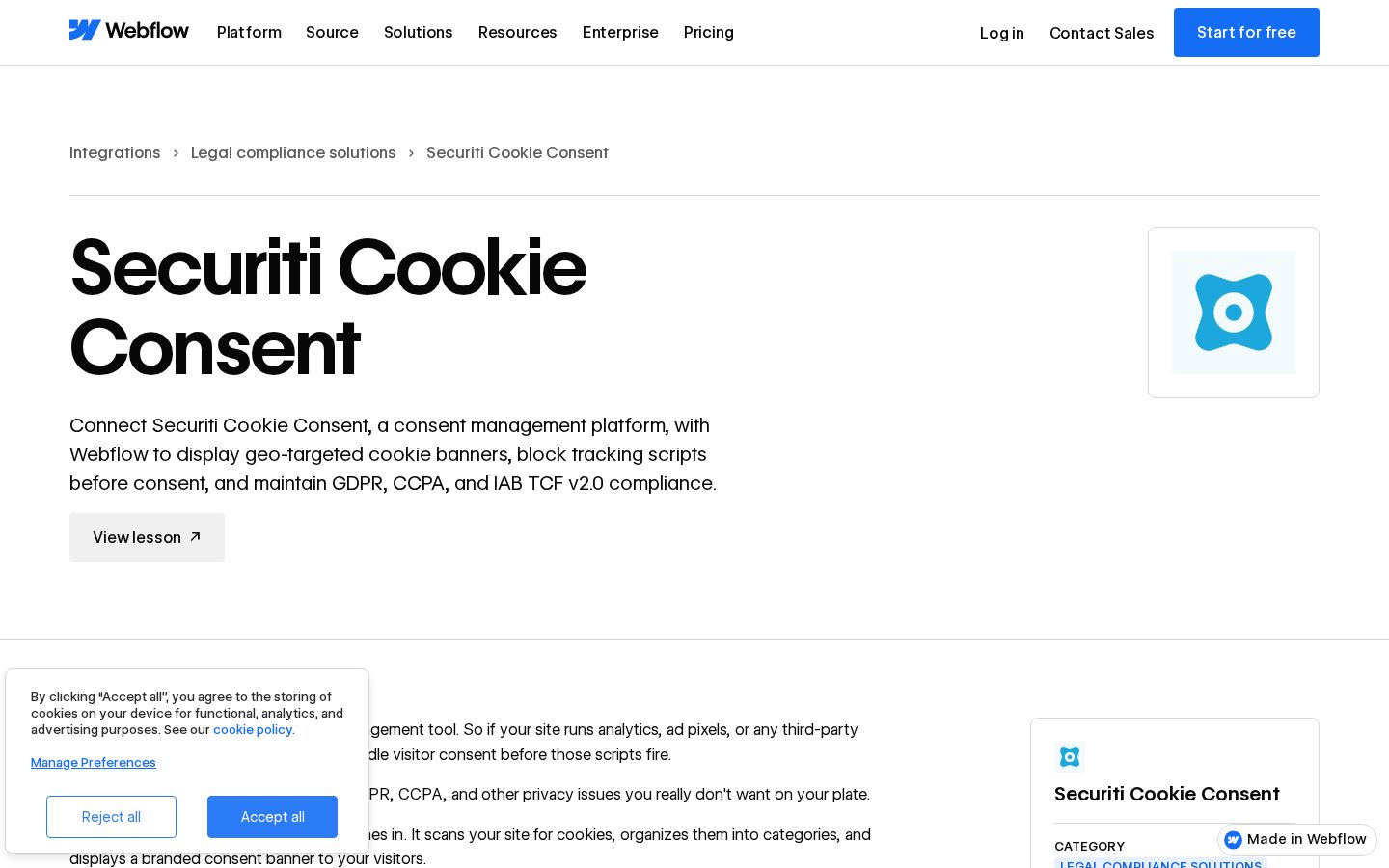
Regional privacy is a property of your whole setup, and each platform is responsible for one piece of it. Someone on your side has to own the whole path.
Embedded third-party tools
Booking widgets, scheduling tools, chat and embedded forms are each a small piece of someone else's website inside yours, and each can run its own tracking that your consent tool does not control. On one site it went the other way.
The consent tool had labeled the booking widget “marketing”, so it blocked the widget completely for every EU visitor who had not clicked “accept”. The most valuable action on the site, booking a sales call, was unavailable to them. Nothing on the site showed an error, and the sales team booked fewer meetings.
Translated language versions
Global B2B sites run many language versions, and each one gives the consent setup a chance to drift. We have seen translated pages whose code still labeled them as English, so they showed an English consent banner to French and Japanese visitors. We have also seen tracking set up for one language that silently missed every other one.
Duplicate tracking on accept
Tracking set to start both when the page loads and when the visitor accepts can run twice for everyone who accepts. Page views and conversions get counted twice for exactly the visitors you are allowed to measure, and nothing warns you.
Data location for every tool
“Where is our data stored?” is a question for every tool in the chain: analytics, CRM, form tool and any data warehouse. Each platform answers it for itself only. The exercise we give every team is to list each tool that touches a visitor (site, consent tool, analytics, ads, chat, booking, forms, CRM) and write next to each one who owns it and where its data is stored. The gaps in that list are your risk.
How to test consent before launch
You test that nothing fires before consent by loading the site as a visitor from each region and recording what it sends in three states: before the banner is answered, after “accept” and after “reject”. A screenshot of the banner tells you nothing about any of the three.

Testing before launch
- List every tag and embed. Write down every piece of tracking code in your tag manager (the tool that loads tracking code on the site) and every embedded tool (chat, booking, forms), as Heuking recommends, so you know what the consent tool has to control.
- Test from the EU. Load the site from an EU location in a fresh browser window with no saved cookies, then repeat from each main market, because a test from the office shows only what your home market sees.
- Record what runs before any answer. With the banner open and untouched, list every cookie the site sets and every outside service it sends data to (your browser's developer tools show both, or your developer can pull the list), and treat anything beyond what the site strictly needs to work as a finding.
- Accept, then record again. Check that each tracking tool runs once and that the consent tool loaded before everything it controls.
- Reject, then record again. Check that no new cookies or data transfers appear after “reject”, the failure in the SHEIN case.
- Test mixed choices. Accept analytics and refuse advertising, then confirm the visitor is still counted in analytics.
- Repeat for each language version. Check that the banner language matches the page and that tracking runs on every language.
- Check the banner's first screen. Make “reject all” one click and as prominent as “accept all”.
- Check the consent log. The consent tool should store every choice with the time, the purpose and the version of the banner the visitor saw, per Heuking.
- Compare the notice with the tracking. Read the banner text and cookie policy against the tracking that actually ran in the test.
The equal-choice check in step 8 has a price attached. California's privacy regulator, the CPPA, settled with Honda for $632,500 in March 2025 over several alleged CCPA violations, including a cookie tool that lacked “symmetrical choice”; the order required a “Reject All” button to match “Allow All”, according to ZwillGen.
Retesting after every change
Consent setups drift after launch. Husch Blackwell's 2026 checklist warns that banners and notices fall out of sync when marketing adds tracking pixels, and tells companies to audit banner language against the tracking actually running. Run the same test after every new widget, market, campaign tag or migration.
The quickest way to find out whether anyone has done this is a single request to your developer or outside team: a list of what the site sends before the visitor answers the banner, after “accept” and after “reject”, checked as a visitor from the EU. If they need a few days to produce it, that tells you it hasn't been checked before.
Decisions before choosing a consent tool
Decide what you need to measure before you choose the consent tool, because you choose the tool once and it touches every number you report afterwards. We give heads of digital four decisions to make first.
The conversions you need to protect
Write down the five or six things that matter: form submissions, booked calls, demo requests and the conversions your ads optimize on. Then check, for each one, what the consent setup does to it for an EU visitor. If you pick the tool first, you find out later which of those it quietly removed.
How Consent Mode is set up
Use Google's Consent Mode, and set it up properly. Done right, a visitor who declines still sends an anonymous signal with no cookies, so Google Analytics can estimate the visits and conversions you cannot see. Done wrong, with Google's tracking blocked outright, you lose the estimate too.
Reporting teams get caught by one side effect. Google Analytics' user count includes those estimates and raw data exports do not, so the two numbers will never match. Pick one, and say in every report which one it is.
Who owns consent after launch
Consent setups rarely break on the day they are built. They break when something next to them changes: a new widget, a new market, a new campaign tag or a site migration. Ask who checks the setup after each of those. “The vendor handles it” is not an answer.
Someone has to rerun the three-state test after every change and own the live site the test protects. We call this WebOps.
Where each tool stores data
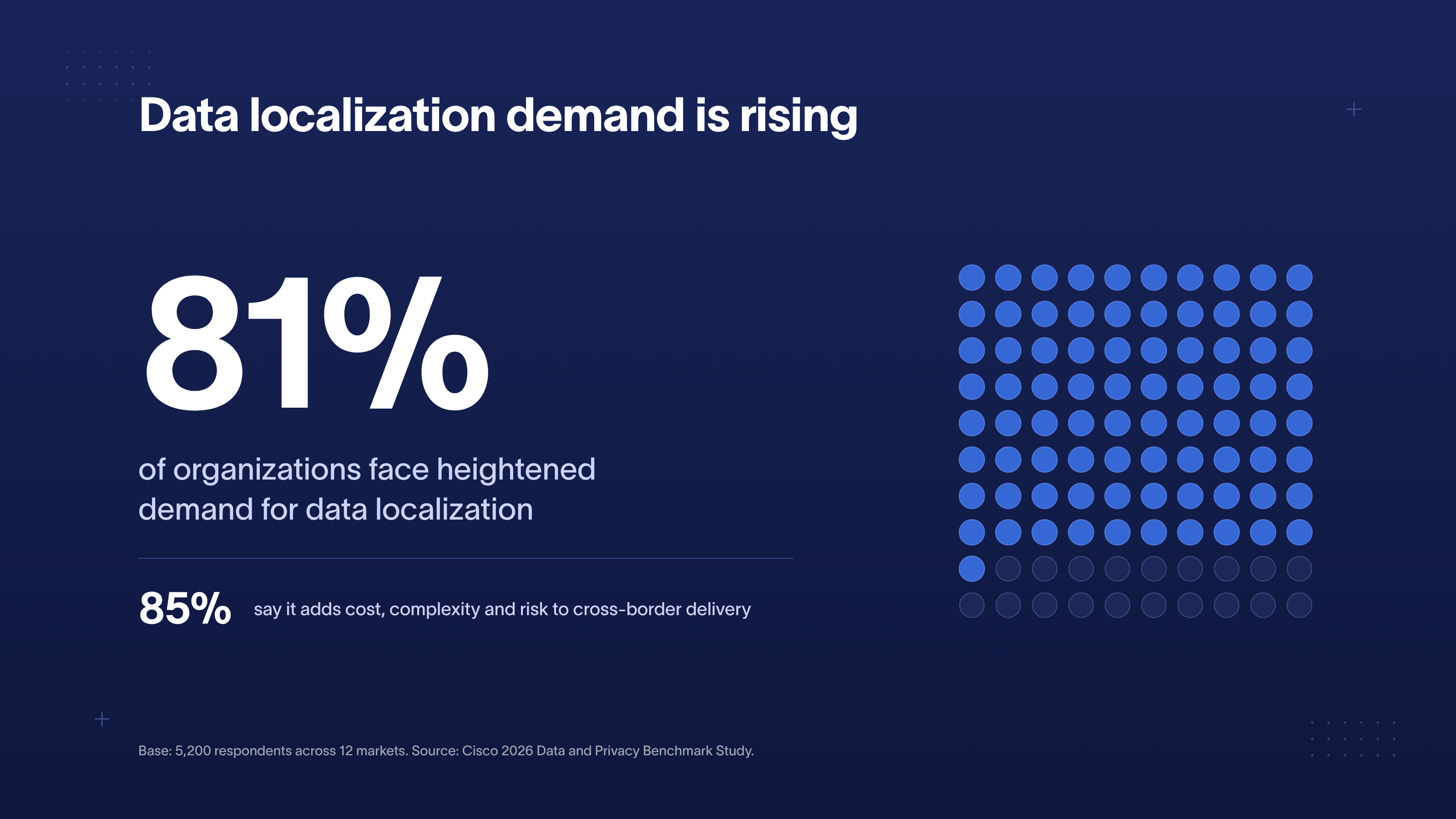
A global B2B company with EU customers should know which of its tools keep data in the EU and which do not, before a customer's procurement team asks. That question is coming more often. In Cisco's 2026 Data and Privacy Benchmark Study of 5,200 respondents across 12 markets, 81% of organizations said they face growing demand to keep data inside a given country or region, and 85% said it adds cost, complexity and risk to cross-border delivery.
Connecting consented visits to CRM revenue
Our Website Intelligence connects what a visitor did on the website to what happened later in the CRM: which pages and campaigns led to a lead, a deal and revenue. Privacy shaped how we built it, so you own the data, only visitors who consented are connected, and email addresses never leave the browser as they were typed.
Your own cloud region
We build Website Intelligence inside your own Google Cloud account, in the data center region you choose, so EU data stays in the EU. It is billed to you. When the build is done, we remove our own access and nothing breaks. We hold none of your data, which gives your procurement team the simplest answer to “who has our data?”. You do.
Emails hashed in the browser
When someone submits a form, their email address is turned into a hash, a one-way code that cannot be turned back into the address, in their own browser. Only the code is sent, and only to your own cloud account. The same code links their website visits to their CRM record, and it is sent only for visitors who accepted analytics. With no consent, nothing is sent.
Hashing in the browser also protects you from fake data. Anything that collects data on a public website can be sent fake submissions by anyone. If the system accepted plain email addresses, someone could push a list of strangers' addresses into it, and you would be holding personal data about people who never visited your site. A code that matches no one in your CRM is harmless.
Hashed emails as personal data
Turning an email into a code changes what can be seen where. It does not make the person anonymous, and it does not take the data outside privacy law. That is why the code goes only to your own cloud account and is never sent to Google Analytics or the ad platforms. Anyone telling you “hashed means anonymous” is wrong.
Reports limited to CRM contacts
Only people already in your CRM appear in reports. A form submission from someone your CRM does not know never reaches a report, so spam and throwaway addresses are left out by design, with no filter rule for someone to maintain. Staff test submissions are flagged and kept, so you decide what counts. Silently removing data is how teams end up with numbers nobody can explain.
Five privacy questions for your team
These five questions take minutes to ask and show quickly whether anyone owns the full path from visitor to report.
- What does our site send before a visitor answers the cookie banner?
- What does an EU visitor see and get, compared with someone in our home market?
- Which of our conversions (forms, booked calls, demo requests) still work for a visitor who says no?
- Which tools on our site run outside the consent tool?
- Who checks all of this after the next site change, and when did they last check?
If any answer starts with “I think”, it's worth finding out.
If the answers come back thin, talk to a strategist about how your next build or migration handles consent, tracking and regional data, or start with a free scan of your website.
FAQ
Is Google Consent Mode v2 mandatory for EU visitors?
If you use Google's ad and measurement tools for visitors in the European Economic Area, Google requires you to pass their consent choices to it, including the ad_user_data and ad_personalization signals in Consent Mode v2. Without those signals, audiences, remarketing and conversion measurement work worse or stop for those visitors, and Google sends no warning. Setups built before Google added the two signals in late 2023 often still lack them, so ask your developer to check your tracking setup even if the banner looks fine.
How does Global Privacy Control work, and does our website have to honor it?
Global Privacy Control is a browser setting that tells every site a visitor opens that they opt out of tracking and data sharing. California's AB 566 requires browsers to offer a setting like this from 1 January 2027, so more of your US visitors will send one. Whether a website must honor it depends on each state's law, so check the states where most of your visitors are. In the EU, the Council removed a duty to honor browser signals from the Digital Omnibus in June 2026. Opt-out enforcement is active in California: the CPPA fined Tractor Supply $1.35 million in September 2025 over opt-outs that did not work, per White & Case.
Which analytics and form tools can we use on a HIPAA-compliant healthcare website?
Use analytics and form tools whose vendors sign a business associate agreement (BAA), a contract in which the vendor agrees to protect patient data under HIPAA, and confirm what it covers on each vendor's BAA page before adding the tool. Also switch off form autocapture in Google Analytics, which in our audits sent a health site's patient contact details to Google. Public pages carry less risk since 2024: in AHA v. Becerra (20 June 2024), a federal court found unlawful the HHS position that an IP address plus a visit to a public page with no login was protected, per the American Hospital Association. HHS guidance still applies to pages behind a login, such as patient portals, according to Ropes & Gray.
Can the site be hosted in Germany and integrate with our CRM in a GDPR-compliant way?
The data connecting your site to your CRM can stay in the EU, because our Website Intelligence runs in your own Google Cloud account in the region you choose and links visits to CRM records with a one-way email code, only for visitors who accepted analytics. Where the website itself is hosted depends on the platform, so ask your platform for its hosting regions and EU data storage options in writing. For any tool in the chain that sends EU data to the US, check whether it relies on the EU-US Data Privacy Framework, which the EU General Court upheld in September 2025 and which now faces an appeal.
How do we get legal and compliance teams to sign off on consent before go-live?
Give legal and compliance teams evidence of what the site does, because an approved banner says nothing about what the site sends. The most useful document is the three-state test: what the site sends before the banner is answered, after accept and after reject, for each region and language. Pair it with the consent tool's log showing the time, purpose and banner version for every choice, as Heuking recommends, and have legal compare the banner text and cookie policy with the tracking that actually ran, the check Husch Blackwell's 2026 checklist calls for.
Will tracking and cookie consent be in place at launch so the new site can fully replace the old one?
Tracking and cookie consent should be live and tested on launch day, because the new site cannot replace the old one until its numbers and consent records hold up. Run the regional three-state test on the staging site (the test copy before launch) and again right after go-live, since a site migration is one of the moments we most often see consent setups break.
Does a cookie consent banner slow down a B2B website?
A cookie consent banner adds weight to every page of a B2B website, because it is one more script and it has to load before all the tracking it controls, so its size and its place in the loading order both matter. Loading it later to save time causes the failure we found on one audited site, where tracking ran before the consent tool existed on the page. Test the consent tool on the staging site with all your tracking in place and measure page speed before you commit.



See your website the way a senior strategist does
Foresight scans your site across 10 strategy dimensions. You get a scored breakdown of every gap costing you leads.
Continue reading









Ready to escape your CMS nightmare?
100+ successful migrations. 0 ranking disasters at launch. One embedded team that's done this before.