.svg)
Website Intelligence: Business Intelligence for Your Website
Key takeaways
- Website Intelligence is an analytics system that joins website behavior data with CRM deal data to show the website’s impact on pipeline, revenue, and ROI.
- Website Intelligence was announced at Webflow Conf 2026 in Boston, the first public look at a system we have run internally for months.
- The simplest way to think about it is business intelligence for your website.
- It shows which pages, channels, and journeys produce pipeline and revenue, so roadmap and budget decisions stop being guesswork.
- Marketing walks into budget talks with revenue numbers, sales reads a lead’s journey before the call, and leadership sees the website’s ROI directly.
- Website Intelligence is opening to a small number of sites first.
Picture your quarterly board meeting. The CFO asks what the website contributed to revenue this quarter and what its ROI is. The usual answer is clicks, impressions, and bounce rates. In the end, everyone knows the question stays unanswered.
But you are not alone. Measuring marketing ROI is the number one challenge marketers face in 2026, cited by 33% of marketers in HubSpot’s 2026 State of Marketing report.
We lived this too, growing more than 30% year over year without knowing which page or campaign drove it, while 90% of our clients reported the same attribution problem.
The problem was that we didn’t have the intelligence to answer this question clearly. All we had was fragmented data.
That gap is what led us to build Website Intelligence, the system our WebOps team created to close it, and we are glad that Webflow Conf 2026 in Boston was the first place we talked about it publicly.
Below, I explain what it is, how it works, what it showed us on our own site, and how you can give it a try as well.
What is Website Intelligence?
Website Intelligence is an analytics system that combines website behavior data with CRM deal data, as well as other data sources, to show how your website drives business results. It reveals which pages, channels, and journeys produce pipeline, revenue, and ROI, as opposed to standard reporting that stops at sessions and conversions.
We coined this term to name a practice we had been running internally for months, on our own website. While business intelligence turns a company’s raw data into decisions, Website Intelligence does the same with website data, so the name presented itself.
Two comparisons explain it fastest.
Website Intelligence vs business intelligence
Where business intelligence covers the whole company, Website Intelligence covers the asset that carries your entire top of funnel. It turns page views, clicks, form fills, and CRM deals into answers about what the site actually contributes to growth.
In plain terms, it is business intelligence for your website.
Enterprise companies analyze their product and their operations daily. The website often carries the entire top of the funnel, yet it still gets judged on page views. That imbalance never made sense to us, and Website Intelligence exists to remove it.
Website Intelligence vs web analytics
GA4 records what an anonymous visitor did. Your CRM records what a named customer paid. No shared key connects the two, so neither system can tell you which pages produced revenue.
Website Intelligence writes that key and joins both sides. Web analytics gives you one row per session and reports engagement. Website Intelligence gives you one row per buyer and reports money.
Web analytics stays useful in this picture, as sessions, clicks, and bounce rates remain valuable inputs that feed the system.
How Website Intelligence works
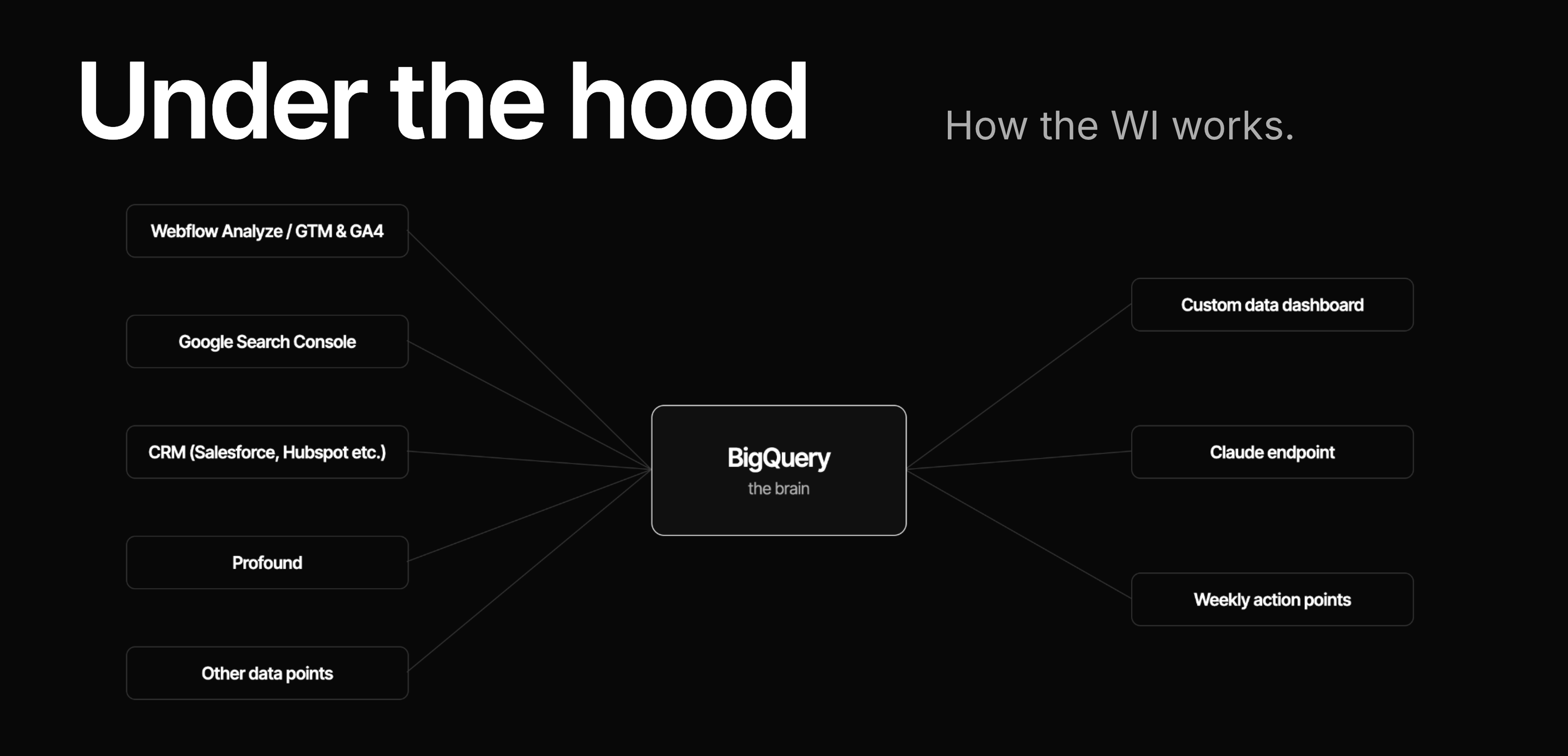
Website Intelligence pulls several data points into one place.
- GA4 or Webflow Analyze supplies behavior data
- Google Search Console supplies search queries
- Your CRM supplies deal and lead data
- Tools like Profound add AI visibility data
Everything lands in BigQuery, which acts as the single brain, and from there the team gets a custom dashboard plus a Claude endpoint it can question directly.
Webflow Analyze or GA4 for data collection
There are two ways to collect the behavior data:
- Webflow Analyze is the out-of-the-box path for Webflow-native sites.
- GA4 with Google Tag Manager is the custom path for teams that want full control over their analytics setup.
Analyze earns its place on Webflow sites. It exports click events already named the way you named them in the Designer, and it records AI visibility data, with no manual tagging pass.
The GA4 path works on any platform, so Website Intelligence has no Webflow requirement. If you run that route, our guide to conversion tracking in Google Analytics shows how the events get captured.
BigQuery joins website and CRM data
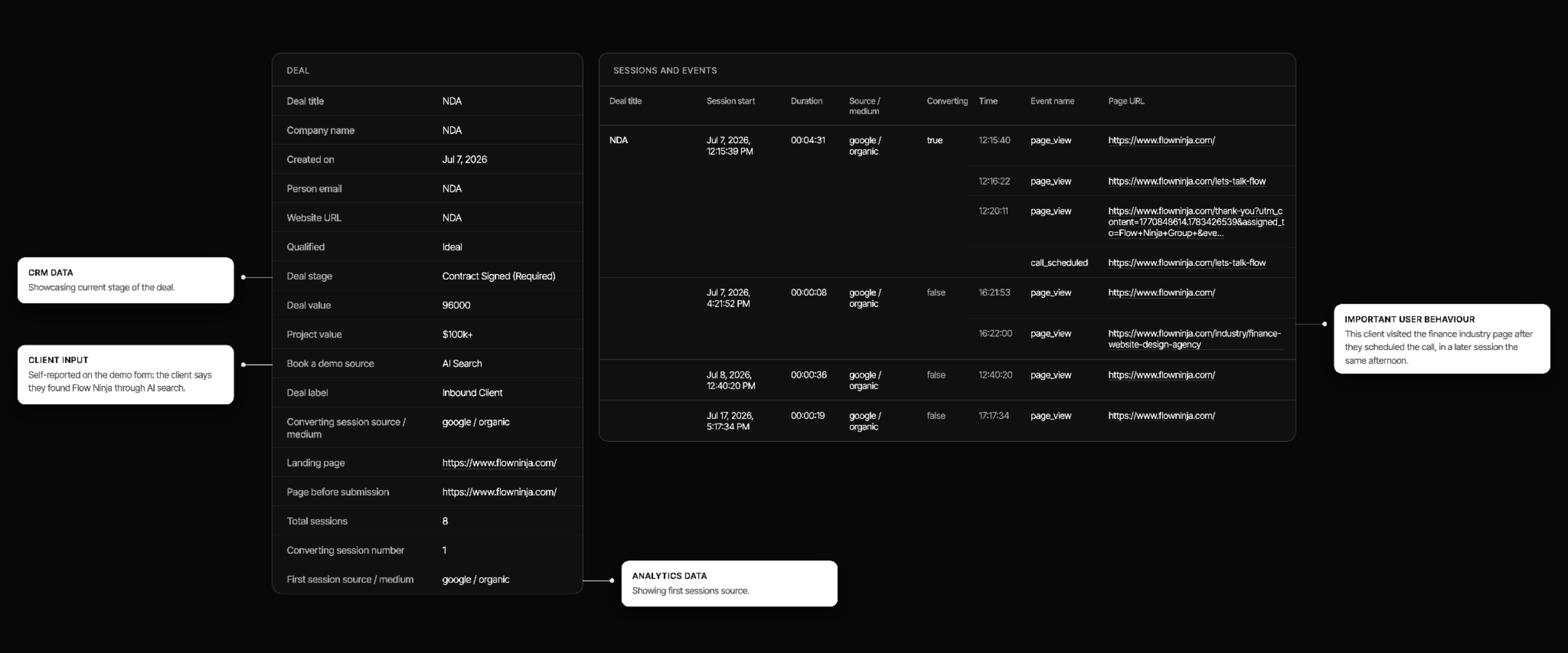
Every data point lands in BigQuery, where website behavior gets matched to CRM deals. Each qualified buyer becomes one row that runs from their first anonymous visit to the closed deal, with the deal value attached.
One row tells the whole story:
- The search or AI answer that started the journey
- Every page read before and after the form
- The meeting that followed
- The deal stage and the amount
Any CRM that can export deals with an email address works, including HubSpot, Salesforce, and Pipedrive. The result is one flat table with columns named in plain English, readable without SQL.
Everything is GDPR compliant, and it requires no additional tech stack beyond the tools named above. It also means there is no vendor to be locked into, because the data lives in your own BigQuery instance and the system keeps collecting it on its own.
Ask Claude about your website data
The table connects to Claude through MCP, so anyone on the team can ask questions in plain English. Every answer comes back with the query that produced it, which means a surprising number can be checked rather than believed. We explained the underlying plumbing in our guide to the Webflow MCP server.
Two questions we ask it every week:
- Which blog posts touched the deals we closed this quarter?
- Which pages did our last five enterprise deals read before booking?
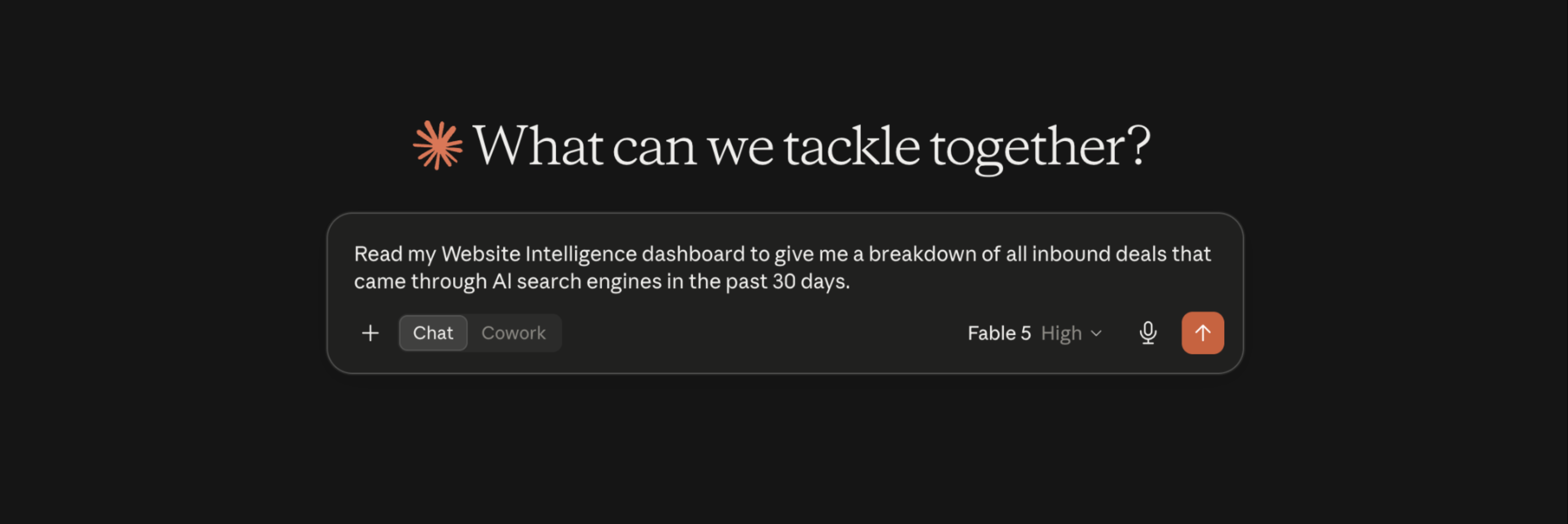
In essence, this works the same as hiring a data analyst and a web strategist in one setup, which is exactly the value you get.
What Website Intelligence showed us at Flow Ninja
We ran Website Intelligence on flowninja.com well before announcing it, which showed us important findings we never would have understood without it. For the first time, we could trace closed revenue back to individual pages and journeys and put a real ROI figure on our own website.
The four findings below reshaped how we run our own site. Each one ends with what it means for your team.
Forgotten pages produced six-figure pipeline
Pages we had stopped maintaining converted more ICP leads and generated more pipeline than pages we treated as core. One page alone brought 70% of our qualified leads. Meanwhile, pages we had reworked five times turned out to be pipeline-dead.
For marketing, this changes how the roadmap gets built. Priority should follow revenue per page instead of traffic or gut feel, and the redesign queue reorders the moment each page carries its deal value. Our map of which pages mattered was wrong until revenue data corrected it, so audit with joined data before your next redesign.
Buyers keep researching after booking a call
Qualified clients kept exploring our site and searching for information after the meeting was booked, sometimes for weeks. The journey never paused while they waited for the call.
The market data agrees. 6sense’s 2025 Buyer Experience Report found that 94% of buying groups ranked their preferred vendors before first contact.
For sales, this is preparation gold. A rep who can see what a lead studied before and after booking opens the call on the topic the buyer already cares about. Post-booking content becomes sales enablement, because the website keeps selling between meetings.
AI search hides inside organic traffic
For a large share of our clients, GA4 showed Organic as the source while the client told us directly that they found Flow Ninja through AI search. This happens because buyers often get their answers in ChatGPT or a similar tool, then type the brand name into Google. Branded organic absorbs the credit, and the report misleads everyone who reads it.
Once we read journeys end to end, $10M of generated pipeline traced back to AI search. Semrush’s research adds weight here, putting the average AI search visitor at 4.4x the value of a traditional organic visitor.
The budget implication is uncomfortable. Teams underinvest in AI visibility because the channel that starts the journey never appears in the report. With Website Intelligence, the top channels can now get the push they deserve to perform even better.
The pricing page predicts qualified pipeline
The pricing page was the second page visited for 95% of our qualified clients. It beat the case studies and every service page to that spot. Sessions that included a pricing page visit also spent almost twice as long on the site.
Two implications follow.
- Pricing deserves treatment as a first-impression conversion asset instead of a formality
- A pricing-page visit joined with CRM data becomes a buying signal your sales team can act on
Try the exercise on your own funnel. Check where pricing sits in your qualified buyers’ journeys, and notice whether you can answer that at all without joined data.
What Website Intelligence changes for your team
The system pays off differently depending on where you sit:
- Heads of marketing walk into budget talks with revenue numbers instead of traffic charts. The roadmap stops being opinion, because every page carries what it produced in deals, and conversion rate optimization best practices get applied where the revenue data points first.
- Sales teams see how a lead arrived and what they read, joined to what happened after the meeting was booked. One record serves both teams.
- In-house web teams prove the impact of their last release instead of defending it. When a rebuilt page starts producing pipeline the data shows it, and pages that already earn their keep stop getting rebuilt.
- Leadership gets a direct answer to what the website contributes to revenue and growth. Pipeline, deal value, and ROI arrive per page and per channel.
W. Edwards Deming put it best. “Without data, you’re just another person with an opinion.” Continuous improvement on exactly this data is what our growth retainer runs on.
How to get Website Intelligence
We are opening Website Intelligence to a small number of websites first, so this stage is early access in the plainest sense.
When you reach out, our first question will be how your CRM data reaches your data warehouse, because that detail sets the timeline. A CRM that already syncs is the fastest starting point, and setup takes weeks rather than months in either case.
If you want your website to answer the ROI question, get Website Intelligence for your site. If you would rather talk it through first, let’s talk.
We built Website Intelligence because we believe every website deserves its own business intelligence. Yours can start answering the ROI question in a matter of weeks.
Frequently Asked Questions about Website Intelligence
How long does Website Intelligence take to set up?
Setup runs weeks rather than months. The tracking layer is a single tag and a small endpoint, and the join runs on scheduled BigQuery queries. The variable that moves the timeline is how your CRM data reaches the warehouse, so a CRM that already syncs is the fastest case.
Do you need Webflow to use Website Intelligence?
No. Website Intelligence reads whatever first-party visitor ID your site already issues, so it works with GA4 and Google Tag Manager on any platform. Webflow sites get more out of it because Webflow Analyze exports click events named the way you named them, with no manual tagging.
Which CRMs does Website Intelligence work with?
Any CRM that can export deals with an email address works, including HubSpot, Salesforce, and Pipedrive. The join happens on a hashed email address instead of a vendor-specific ID, which makes the CRM interchangeable. What varies between setups is how the CRM data reaches your warehouse.
Is joining website and CRM data GDPR compliant?
Yes, the setup is built for it. The data stays in your own BigQuery instance, in the region your policy requires. Emails are stored as one-way SHA-256 hashes and never in the clear, nothing is captured before the visitor’s consent choice is read, and the AI layer runs on a read-only account.
Do you need a data analyst to run Website Intelligence?
No. The output is one flat table with columns named in plain English, readable without SQL. Claude answers questions about it directly and returns the query behind every answer, so anyone on the team can verify a number instead of taking it on faith.
How is Website Intelligence different from a customer data platform?
A customer data platform connects many systems and asks you to set up tracking and adopt its schema first. Website Intelligence connects two, your website and your CRM, and the tracking setup is included because the team building it also runs your site. That narrower scope is why setup stays a matter of weeks.

Uros Mikic
Founder and CEO of Flow Ninja. Building in Webflow since 2015, he writes on platform choice, CMS migration, and website intelligence, and runs a YouTube channel on the same.


See your website the way a senior strategist does
Foresight scans your site across 10 strategy dimensions. You get a scored breakdown of every gap costing you leads.
Continue reading




.png)





Ready to escape your CMS nightmare
100+ successful migrations. 0 ranking disasters at launch. One embedded team that's done this before.