

.svg)
What Is Webflow? The Complete Guide for 2026

Key takeaways
- Webflow combines visual design with clean, production-ready HTML, CSS, and JavaScript, removing the need for heavy manual development.
- The platform has evolved into a full Website Experience Platform with built-in AI, analytics, A/B testing, and localization.
- Webflow AI can now scaffold page layouts, generate content, auto-create SEO metadata, and build entire sites from text prompts.
- The next-gen CMS (rebuilt in 2025) supports headless content delivery, individual item publishing, and draft modes.
- The legacy Webflow Editor is being retired on August 4, 2026. Teams relying on it should transition to the new editing experience now.
- Webflow Analyze and Webflow Optimize bring native, cookieless analytics and A/B testing directly into the platform.
- Localization is now available to all users, making multilingual websites natively supported.
- Pricing starts free and scales from $14/month for a basic site to custom enterprise plans, with modular add-ons.
- Flow Ninja helps businesses unlock Webflow's full potential with expert design, development, SEO, and ongoing WebOps.
Webflow is a visual website development platform that lets you design, build, and grow professional websites with complete control over code, content, and performance. But calling it just a "website builder" in 2026 would be underselling it significantly.
Webflow now calls itself a Website Experience Platform (WXP). That means it handles everything from visual front-end design and content management to native analytics, A/B testing, AI-powered site generation, and hosting on Cloudflare's global infrastructure.
We've been building on Webflow since 2015 and have shipped over 100 projects on the platform. This guide covers everything we've learned about what Webflow is, what it can do, what it costs, and how it compares to the alternatives in 2026.
Webflow in 2026: More Than a Website Builder
Companies like Monday.com, TED, Philips, and Discord run their web presence on Webflow. The reason is straightforward: Webflow gives marketing teams the power to ship website changes without developer dependencies, while giving developers confidence that the underlying code meets production standards.
In our experience, the teams that get the most from Webflow share one trait. They want to move fast without sacrificing quality. That means designers who want pixel-perfect control, marketers who want to publish without filing a Jira ticket, and developers who want clean semantic output they can extend when needed.
Who Uses Webflow (and Why)
Marketing teams use Webflow because they can create, edit, and publish content without waiting on a developer. Complete design for landing pages, campaign microsites, and blog posts can go live in hours instead of weeks.
Design professionals use Webflow because it translates their creative vision directly into working code. There is no "design handoff" gap where fidelity gets lost.
Developers and agencies use Webflow because the output is clean, semantic HTML and CSS that follows professional standards. When custom functionality is needed, Webflow supports custom code, API integrations, and now even full-stack app hosting through Webflow Cloud.
For a deeper look at how we approach Webflow projects, see our in-depth Webflow review.
What Can You Build with Webflow?
The short answer: almost anything. The platform and its surrounding ecosystem of third-party tools have matured to a point where 99% of responsive websites can be built in Webflow.

Here is what you can build:
- One-page websites (portfolios, landing pages)
- Marketing websites
- SaaS and technology websites
- Business websites (local or international)
- Ecommerce websites (digital or physical products)
- Blogs and content-driven niche sites
- Programmatic SEO websites
- Web applications (via Webflow Cloud and custom code)
- Online tool websites (calculators, converters, directories)
- Gated content sites (courses, subscriptions, memberships)
- Headless CMS-powered sites (using Content Delivery APIs)
- Multi-language websites (via native Localization)
From building apps in Webflow to complex programmatic SEO builds, the platform covers more ground than most teams will ever need.
Webflow Cloud: Full-Stack App Hosting
One of the biggest shifts in 2025 was the launch of Webflow Cloud. This allows developers to build and host full-stack web applications, complete with backend logic and dynamic functionality, all within the Webflow infrastructure.
You no longer need to manage separate servers for apps that go beyond static front-end pages.
Webflow's Core Tools: Designer, Editor, and AI
Webflow's toolkit breaks into three main areas. The Designer is where you build. The Editor is where non-technical team members update content. And Webflow AI is the newest layer that accelerates both.
Learning to use Webflow can feel easy or challenging depending on your background. If you understand the basics of HTML, CSS, and JavaScript, you will pick it up quickly. If not, there is a learning curve, but Webflow University is one of the best free web design and development learning platforms online.
Webflow Designer
Webflow Designer is where you create your website. This is where new pages are built, sections are styled, interactions are added, and the site is published.
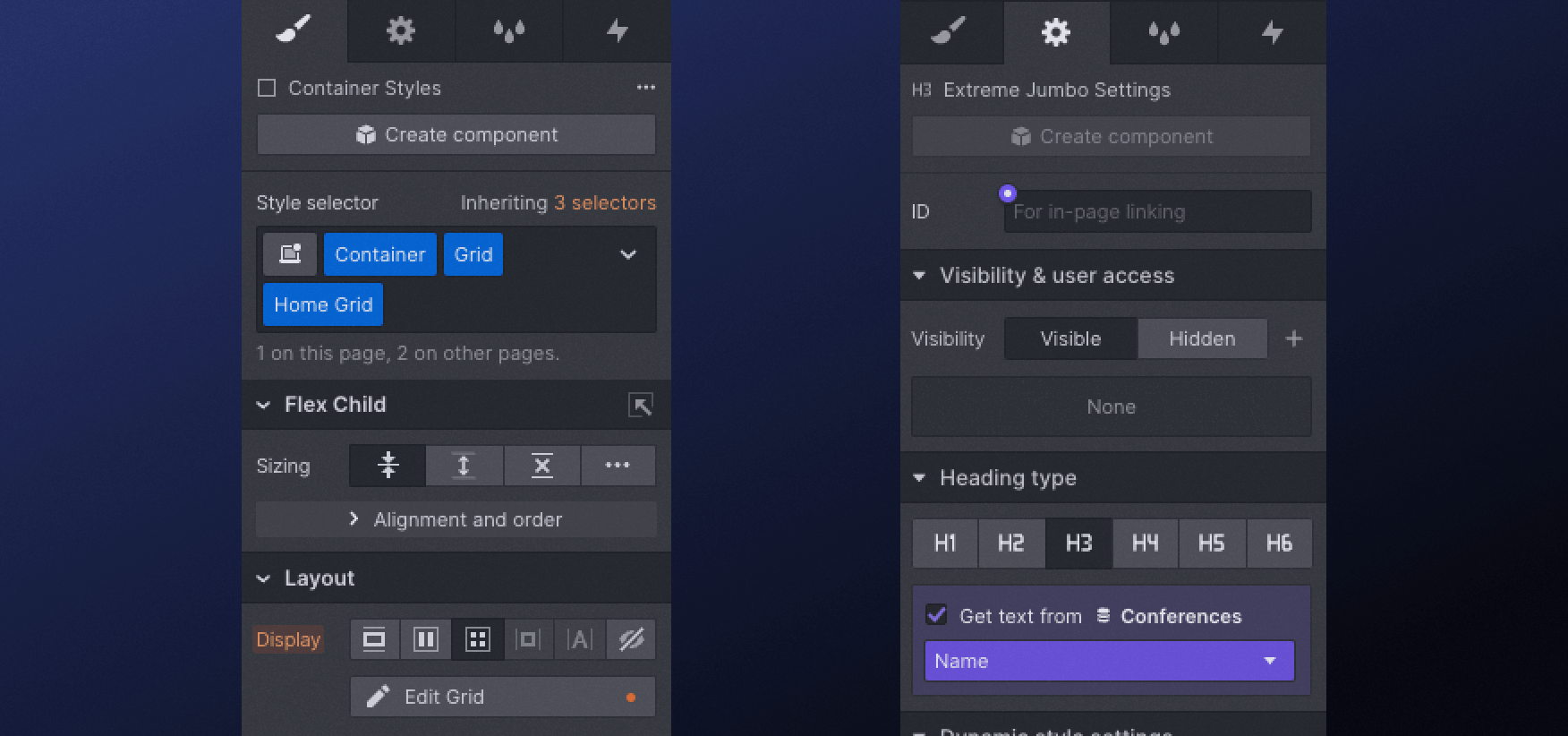
While the tool is called "Designer," it is more accurately a visual code editor. It has a UI that feels like Photoshop or Figma, but underneath it runs on real web development principles: HTML structure, CSS classes, Flexbox, Grid, and JavaScript logic.
What makes the Designer powerful in 2026:
- HTML drag-and-drop components. Add headings, paragraphs, divs, links, and other standard HTML elements visually.
- CSS control that feels like Photoshop. Resize elements, change colours, apply animations to different component states.
- GSAP-powered interactions. Webflow integrated GSAP (GreenSock Animation Platform) in 2025, giving you a visual timeline editor for advanced animations.
- Real-time multi-user collaboration. Multiple designers can now work on the same project simultaneously.
- Component Canvas. A Figma-like interface for managing and building reusable components.
- Per-page CSS optimization. More granular CSS to reduce wasted styles and improve page load times.

Figma to Webflow Integration
The Figma to Webflow plugin allows you to turn Figma designs into real Webflow websites. The integration has deepened significantly since its initial launch, with better support for layout fidelity, design tokens, and component mapping.
There are plenty of Webflow development agencies (including us) that specialise in taking Figma designs and rebuilding them in Webflow with full production quality.
Webflow Editor (and What's Changing in 2026)
The Webflow Editor has historically been the tool that makes Webflow shine for non-technical team members. Business owners, marketers, and content managers could add ?edit after any page URL and directly edit text, images, links, and CMS content without touching the Designer.
However, there is a critical change coming. The legacy Webflow Editor is being retired on August 4, 2026. Webflow has transitioned to a new in-context editing experience built directly into the main platform.
The new editing experience allows content updates, metadata changes, and CMS edits to happen directly on the canvas. If your team currently relies on the legacy Editor for content updates, plan the transition now.
For a deeper breakdown, read our guide on Webflow Designer vs Editor vs CMS.
Webflow AI
This is entirely new since 2023, and it is one of the biggest shifts on the platform. Every Webflow plan now includes Webflow AI, which brings several capabilities directly into the build and content workflow.
What Webflow AI can do:
- AI Assistant. A conversational partner inside the Designer that helps with creating layouts, refactoring sections, and suggesting design improvements.
- AI Site Builder. Generate complete website scaffolds from text prompts.
- AI-powered SEO. Automatically generate alt text for images, meta descriptions, and schema markup suggestions.
- AI content generation. One-click text generation and modification within the CMS.
For teams that want to ship faster, Webflow AI reduces the time from concept to published page significantly.
Webflow CMS: Content Management Rebuilt from the Ground Up
Both Webflow Designer and Editor give you access to one of Webflow's most powerful features: the CMS (Content Management System). In 2025, Webflow rebuilt the CMS from the ground up, and the result is a significantly more powerful system.
CMS Collections and Templates

In Webflow, CMS Collections are your dynamic content types. They share the same design template but can have different content, and each item gets a unique URL. Think of Collections as blog articles, service pages, product listings, team member profiles, job postings, and case studies.
Each CMS Collection has two main components: data fields (the structured information) and page visual design (the template that inherits data from those fields).

What makes Webflow's CMS unique is that Collections can be connected to other Collections through reference fields. This makes Webflow one of the most flexible CMS tools available for marketing websites.
What Changed with the Next-Gen CMS
The 2025 CMS rebuild brought several major improvements:
- More complexity and scale. The new CMS handles larger datasets and more complex content structures.
- Headless CMS with Content Delivery APIs. Publish content to multiple sites, apps, and platforms from a single source of truth.
- Individual CMS item publishing. Publish or unpublish a single blog post without triggering a full site republish.
- Draft modes. Make changes to published CMS items without affecting the live version.
- Expanded CMS item limits. Business plans now support up to 20,000 CMS items.
- API improvements. Stronger REST API support for programmatically managing CMS content.
Webflow Localization
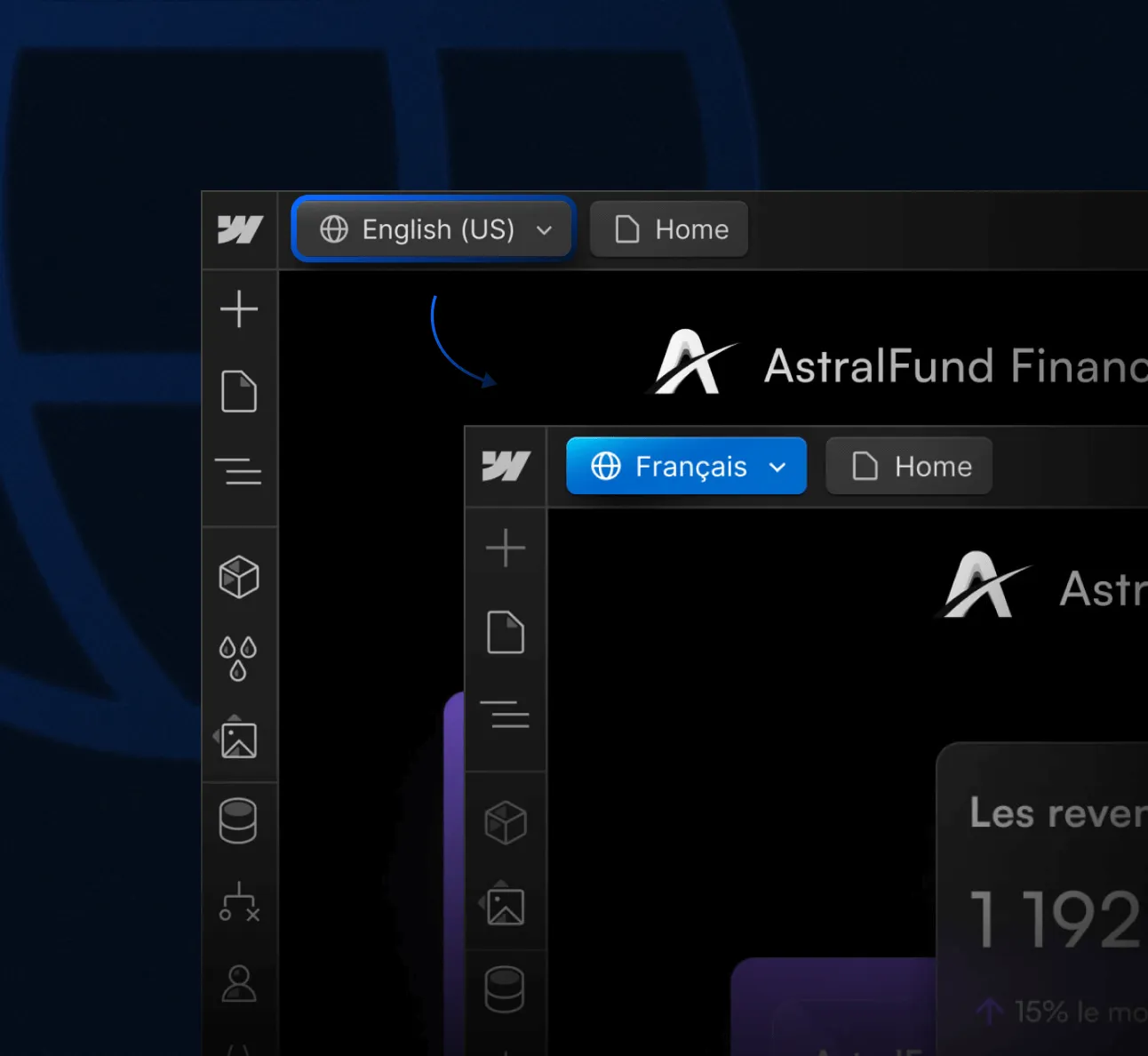
Localization has been rolled out to all Webflow customers, making multilingual websites natively supported. There are two tiers: Localization Essential ($9/month per locale, up to 3 locales) and Localization Advanced ($29/month per locale, up to 10 locales).
Important limitation: Webflow Localization is not yet compatible with Webflow Ecommerce.
Webflow for SEO and AI Search Visibility

Search engine optimisation in Webflow is one of the platform's strongest selling points. We have covered this in depth in our guide on whether Webflow is good for SEO.
Built-In SEO Features
The essential SEO features come natively, without any plugins:
- Title tags and meta descriptions (per page and per CMS item)
- Automatic XML sitemap generation
- 301 redirects and robots.txt configuration
- Canonical tags and Open Graph tags
- Custom schema markup (JSON-LD via custom code)
- Heading hierarchy control and image alt text
- Clean URL slug management and hreflang support
For the full technical setup, see our Webflow technical SEO guide and our list of the best Webflow SEO tools.
Page Speed and Core Web Vitals
Hosting your website on Webflow means your site runs on infrastructure powered by AWS and Cloudflare, with HTTP/2 (SSL), a global CDN, advanced DDoS protection, and automatic backups.

When it comes to Core Web Vitals, properly developed Webflow sites produce lean code that performs well. LCP (Largest Contentful Paint), INP (Interaction to Next Paint), and CLS (Cumulative Layout Shift) are rarely problematic.
Webflow Analyze and Optimize
Webflow Analyze ($9/month) provides privacy-friendly, cookieless analytics built directly into the Webflow dashboard.
Webflow Optimize (starting at $299/month) brings A/B testing and AI-driven personalization directly into the platform.
AEO: Preparing for AI Search
Webflow's clean HTML output and flexible content structure make it well suited for Answer Engine Optimisation (AEO). Webflow's AI crawler control toggle also lets you restrict AI crawlers from consuming your hosting bandwidth.
We wrote extensively about this in our guide on SEO & AEO for SaaS websites. If you want a full performance check, run a free AI website audit with Foresight.
Webflow Ecommerce in 2026
Using Webflow for ecommerce stores gives you complete design and UI/UX control that other ecommerce platforms cannot match. There are over 16,600 live Webflow ecommerce stores as of early 2026.

Selling Digital Products
Webflow is arguably the best platform for selling digital products online. Courses, ebooks, templates, and digital downloads can be set up easily with automated fulfilment.
Selling Physical Products
For physical products, Webflow offers solid tools for small to mid-sized stores. However, for complex stores with large inventories or subscriptions, dedicated platforms like Shopify remain stronger. You can connect Webflow and Shopify for a hybrid approach.
Ecommerce Pricing
Standard starts at $29/month (annual) with a 2% Webflow transaction fee. Plus at $84/month removes the transaction fee. Advanced is for high-volume stores. Note: Webflow Localization is not compatible with Ecommerce.
Webflow Pricing in 2026
Knowing exactly which Webflow pricing option to choose can feel overwhelming at first. Webflow uses a dual billing system: Site Plans (for hosting) and Workspace Plans (for team collaboration). All prices below are for annual billing.
Site Plans
The Business plan is modular: base tier ($39/month) gives 10,000 CMS items. Higher capacity scales up to $1,049/month. For the most current details, check the official Webflow pricing page.
We recommend starting with a consultation if you consider an enterprise-level Webflow website.
Workspace Plans
Workspace Plans are charged per seat: Starter (Free), Core ($19/month per seat), and Agency ($35/month per seat).
Add-Ons
- Localization Essential: $9/month per locale
- Localization Advanced: $29/month per locale
- Analyze: $9/month for native cookieless analytics
- Optimize: From $299/month for A/B testing and personalization
Combining Webflow with Other Tools
While there are so many amazing Webflow resources out there, Webflow gives you complete control of your code, so integrating third-party tools is usually as simple as adding a script tag.

What has changed since 2023 is the Webflow Apps marketplace: a native ecosystem of extensions that install directly inside the Designer. Webflow's MCP server also now supports AI agents interacting directly with the Webflow Designer from tools like Cursor.
How Webflow Compares to Other Platforms
Webflow is not only one of the best WordPress alternatives; it also outperforms most website builders for business use cases.
Webflow vs WordPress
When comparing Webflow to WordPress, the core tension remains: WordPress is open-source but the real cost includes hosting, themes, plugins, security, and maintenance.
WordPress still powers over 40% of the web and remains strong for content-heavy publishing. But Webflow's native AI, analytics, and A/B testing reduce the plugin dependency gap. WordPress design tools like Elementor are not even close to Webflow's capabilities.
Having a WordPress site is often about fixing issues. Having a Webflow website is about growing it.
Webflow vs Shopify
Shopify is purpose-built for ecommerce. If you need a store that ships physical products at volume, Shopify wins. But using Webflow for your marketing site while connecting to Shopify for the storefront gives you the best of both.
Webflow vs Wix
To compare Webflow to Wix is difficult because Wix is a true no-code builder for non-technical people. For a tiny site with no revenue goals, Wix can work. But if you own a business that needs to rank and convert, Webflow is the choice.
Webflow vs Squarespace
You can't really compare Webflow to Squarespace because Squarespace is aimed at ease of use for non-technical people. Any business-oriented website build should not consider Squarespace over Webflow.
Webflow vs Framer
Framer has emerged as a serious Webflow competitor since 2023. Framer's learning curve is shorter, and you can go from idea to published site faster. However, Webflow leads in CMS depth, SEO control, ecommerce, and enterprise features.
Choose Framer for speed on smaller projects. Choose Webflow for scalable, SEO-optimised, CMS-driven sites.
Webflow Templates

If your budget is tight, Webflow has both paid and free templates. With Webflow AI's Site Builder, you can also generate a starting structure from a text prompt. We have built some free and paid Webflow templates for marketing use cases. For a curated list, see our guide to the best Webflow templates.
When to Hire a Webflow Expert
Webflow Designers create custom, visually distinctive websites. Webflow Developers handle complex builds, integrations, and custom CMS architectures. Webflow Marketers manage content strategy, SEO, and growth.
The biggest risk is hiring a generalist who claims to do all three. Each discipline requires depth. Hiring an agency with a team of diverse professionals and enterprise Webflow experience is often the way to go.
Flow Ninja Is Your Webflow Partner
We are a full-service WebOps team that designs, builds, runs, and grows Webflow websites for modern marketing teams. As Webflow's Enterprise Partner of the Year, we work across finance, recruitment, blockchain, manufacturing, consulting, education, and technology.
Our global WebOps team handles everything from strategy and design to development, SEO, AEO, and ongoing optimisation.
Not sure where to start? Run a free AI website audit with Foresight to see where your current site stands. Or book a free strategy call to talk through your project.
For technology and SaaS companies, visit our technology and SaaS website services page.
FAQ: Everything Else You Want to Know About Webflow
Is Webflow a no-code tool or a visual code editor?
Webflow sits between the two. It provides a visual interface that generates production-ready HTML, CSS, and JavaScript. You do not need to write code, but understanding basic web development concepts (like CSS classes and the box model) helps you use it more effectively. It is more powerful than traditional no-code tools and more accessible than writing code manually.
How much does a Webflow website cost in 2026?
Platform costs range from free (Starter plan on a webflow.io subdomain) to $23 to $39/month for most business sites, plus optional add-ons. If hiring a professional to design and build the site, expect $2,000 to $10,000 for a freelancer and $5,000 to $50,000+ for an agency, depending on project complexity.
Is Webflow good for SEO?
Yes. Webflow generates clean, semantic HTML, supports customisable meta tags, automatic sitemaps, 301 redirects, canonical tags, and structured data. Its hosting infrastructure delivers fast page loads and strong Core Web Vitals scores. Combined with native tools like Webflow Analyze and AI-powered metadata generation, it is one of the strongest platforms for SEO in 2026.
Can you build an ecommerce store on Webflow?
Yes, but with caveats. Webflow Ecommerce works well for digital products and small to mid-sized physical product stores. For complex stores with large inventories, subscriptions, or advanced fulfilment needs, Shopify remains stronger. A hybrid approach (Webflow front-end, Shopify back-end) is often the best solution.
What is Webflow AI and what can it do?
Webflow AI includes an in-Designer AI Assistant for layout suggestions and content generation, an AI Site Builder that scaffolds entire websites from text prompts, and AI-powered SEO tools that auto-generate alt text, metadata, and schema markup. It is included with every Webflow plan at no additional cost.
How does Webflow compare to Framer?
Framer is faster to learn and great for quick, design-forward projects. Webflow offers deeper CMS capabilities, stronger SEO control, native ecommerce, and enterprise-grade features like SSO and audit logs. For long-term, scalable business websites, Webflow is the stronger choice. For smaller, fast-turnaround projects, Framer is a legitimate alternative.
Is Webflow good for enterprise websites?
Yes. Webflow's Enterprise plan includes SSO, custom SLAs, dedicated support, audit logs, and custom role definitions. Companies like Monday.com, Philips, and Discord use Webflow for enterprise web projects. The platform was recognised as a Strong Performer in the Forrester CMS Wave, and its Cloudflare-powered infrastructure provides enterprise-grade performance and security.
Can marketing teams update a Webflow site without developers?
Absolutely. Webflow's CMS and editing tools allow marketing teams to create, edit, and publish content independently. The new in-context editing experience (replacing the legacy Editor in August 2026) makes this even more seamless, as content changes happen directly on the live page canvas without needing Designer access.
Does Webflow support multiple languages?
Yes. Webflow Localization is now available to all users. It supports multiple languages, translation management, and SEO optimisation for different locales. Plans start at $9/month per locale. Note that Localization is not yet compatible with Webflow Ecommerce.
What happens to the Webflow Editor in 2026?
The legacy Webflow Editor is being retired on August 4, 2026. It is being replaced by a new in-context editing experience integrated directly into the platform. The core functionality (editing text, images, and CMS content without Designer access) remains, but the interface and workflow are changing. Teams should plan their transition before the deadline.
Search Historian
Search Historian is a Webflow SEO expert, Sitemap Architect and Content Strategist at Content Nest. He specializes in scalable sitemap planning and SEO optimized CMS information architecture.
Foresight website audit
Enter your website URL and get free website audit report in 2 minutes.
Continue reading







.webp)
Ready to escape your CMS nightmare
100+ successful migrations. 0 ranking disasters at launch. One embedded team that's done this before.

